mirror of
https://github.com/bin456789/reinstall.git
synced 2026-04-09 09:27:43 +08:00
Compare commits
81 Commits
97779b6f6e
...
main
| Author | SHA1 | Date | |
|---|---|---|---|
| 2d676731bb | |||
| 93e83dfc58 | |||
| e93d71680c | |||
| f0fc83a060 | |||
| 07d8018db3 | |||
| e104735538 | |||
| 43e226cc5c | |||
| c6000c16ab | |||
| 8dd873d7dd | |||
| 41c4df9fdb | |||
| f0b3a475fc | |||
| 5e2f46444c | |||
| c784479408 | |||
| ca11ab5ef8 | |||
| 2c6b28108a | |||
| 28119bb0c5 | |||
| 53e699fa11 | |||
| b2f2927c4e | |||
| 13e3155d02 | |||
| 5b1b9103f4 | |||
| 5b0d91c633 | |||
| ecacaab103 | |||
| 99b99cc7ac | |||
| 81081873df | |||
| 4cf8e81fc7 | |||
| ff4b6de258 | |||
| fc7bdc5711 | |||
| f2cfe672d1 | |||
| 0cc3fc77d6 | |||
| 6a35bf681a | |||
| e7f8802bdd | |||
| 259bcf7275 | |||
| 90becc9850 | |||
| 85e2661161 | |||
| 74d9524a9b | |||
| 1a3d8b4f3b | |||
| 0c5fac6d6b | |||
| e60a8d0de2 | |||
| 2a561f0d8c | |||
| 586eb5dee1 | |||
| c94f334663 | |||
| bd5e118570 | |||
| 78ba0690f9 | |||
| 9e0968eabd | |||
| 3263ea3875 | |||
| 7c19559d86 | |||
| 8b838f8871 | |||
| 5bf00edeed | |||
| 85637edc5b | |||
| baa430eb10 | |||
| 66f3173c7b | |||
| af84ac0b3c | |||
| 57a88a6bd9 | |||
| 24a4446a02 | |||
| 780e1a694f | |||
| 43ba86076f | |||
| f22cda1f10 | |||
| 28e10128ff | |||
| 974d5712f0 | |||
| 845fa66e03 | |||
| 48823b4101 | |||
| d212eb793c | |||
| aa1fc741fa | |||
| 74665b65cc | |||
| 6708c77c63 | |||
| 1afc1a0022 | |||
| cdf09d017f | |||
| 8d55af091d | |||
| 8689c45b07 | |||
| ce8a315a2e | |||
| cf6b4c226d | |||
| b098c0cabd | |||
| 2a0690a395 | |||
| 30a3616bf8 | |||
| df2bda09dc | |||
| 38a5cc3940 | |||
| c7e156dae4 | |||
| edcefc3e8c | |||
| 29023e0f44 | |||
| 8b424e8091 | |||
| 9521e84703 |

@ -23,3 +23,6 @@ charset = utf-8-bom
|
|||||||
|
|
||||||
[*.{yml,yaml}]
|
[*.{yml,yaml}]
|
||||||
indent_size = 2
|
indent_size = 2
|
||||||
|
|
||||||
|
[reinstall.sh]
|
||||||
|
shell_variant = bash
|
||||||
|
|||||||
15
.github/ISSUE_TEMPLATE/bug_report.md
vendored
15
.github/ISSUE_TEMPLATE/bug_report.md
vendored
@ -7,10 +7,13 @@ assignees: ''
|
|||||||
|
|
||||||
---
|
---
|
||||||
|
|
||||||
原来的系统:
|
原来的系统 (Original system):
|
||||||
要安装的系统:
|
|
||||||
遇到的问题:截图或者登录 SSH 获取日志 /reinstall.log
|
|
||||||
|
|
||||||
Original system:
|
要安装的系统 (System to be installed):
|
||||||
System to be installed:
|
|
||||||
Issues encountered: Screenshot or log in via SSH to get the logs from /reinstall.log
|
遇到的问题 (Issue):
|
||||||
|
|
||||||
|
<!--
|
||||||
|
请上传截图或者报错内容,注意删除 IP 地址和密码
|
||||||
|
(Please Upload Screenshot or error message. Be sure to delete the IP address and password)
|
||||||
|
-->
|
||||||
|
|||||||
21
.github/workflows/run_reinstall.yml
vendored
21
.github/workflows/run_reinstall.yml
vendored
@ -21,23 +21,26 @@ jobs:
|
|||||||
git config --global core.autocrlf false
|
git config --global core.autocrlf false
|
||||||
- uses: actions/checkout@v4
|
- uses: actions/checkout@v4
|
||||||
- run: |
|
- run: |
|
||||||
${{ matrix.command }} centos
|
# ${{ matrix.command }} centos
|
||||||
${{ matrix.command }} almalinux 8
|
${{ matrix.command }} almalinux
|
||||||
${{ matrix.command }} rocky 9
|
# ${{ matrix.command }} rocky
|
||||||
${{ matrix.command }} fedora
|
# ${{ matrix.command }} fedora
|
||||||
|
# ${{ matrix.command }} oracle
|
||||||
${{ matrix.command }} ubuntu
|
${{ matrix.command }} ubuntu
|
||||||
${{ matrix.command }} debian
|
${{ matrix.command }} debian
|
||||||
${{ matrix.command }} debian --ci
|
${{ matrix.command }} debian --ci
|
||||||
${{ matrix.command }} kali
|
# ${{ matrix.command }} kali
|
||||||
${{ matrix.command }} alpine
|
# ${{ matrix.command }} alpine
|
||||||
${{ matrix.command }} opensuse
|
# ${{ matrix.command }} opensuse
|
||||||
${{ matrix.command }} arch
|
# ${{ matrix.command }} arch
|
||||||
${{ matrix.command }} gentoo
|
# ${{ matrix.command }} gentoo
|
||||||
|
|
||||||
${{ matrix.command }} netboot.xyz
|
${{ matrix.command }} netboot.xyz
|
||||||
${{ matrix.command }} dd --img=https://download.opensuse.org/tumbleweed/appliances/openSUSE-MicroOS.x86_64-SelfInstall.raw.xz
|
${{ matrix.command }} dd --img=https://download.opensuse.org/tumbleweed/appliances/openSUSE-MicroOS.x86_64-SelfInstall.raw.xz
|
||||||
${{ matrix.command }} windows --image-name='Windows Server blah' --iso https://aka.ms/HCIReleaseImage
|
${{ matrix.command }} windows --image-name='Windows Server blah' --iso https://aka.ms/HCIReleaseImage
|
||||||
|
|
||||||
|
${{ matrix.command }} reset
|
||||||
|
|
||||||
# 测试失败例子
|
# 测试失败例子
|
||||||
# ${{ matrix.command }} wrong-os
|
# ${{ matrix.command }} wrong-os
|
||||||
# ${{ matrix.command }} dd --img=https://github.com/
|
# ${{ matrix.command }} dd --img=https://github.com/
|
||||||
|
|||||||
322
README.en.md
322
README.en.md
@ -4,25 +4,42 @@
|
|||||||
|
|
||||||
[](https://app.codacy.com/gh/bin456789/reinstall/dashboard)
|
[](https://app.codacy.com/gh/bin456789/reinstall/dashboard)
|
||||||
[](https://www.codefactor.io/repository/github/bin456789/reinstall)
|
[](https://www.codefactor.io/repository/github/bin456789/reinstall)
|
||||||
[](https://github.com/XAMPPRocky/tokei_rs)
|
[](https://github.com/aschey/vercel-tokei)
|
||||||
[](https://t.me/reinstall_os)
|
<!-- [](https://github.com/XAMPPRocky/tokei_rs) -->
|
||||||
[](https://github.com/sponsors/bin456789)
|
|
||||||
|
|
||||||
One-Click Script to Reinstall System [中文](README.md)
|
One-Click system reinstallation script for VPS [中文](README.md)
|
||||||
|
|
||||||
[](https://github.com/sponsors/bin456789)
|
## Introduction
|
||||||
|
|
||||||
## Highlights
|
- One-click reinstallation to Linux: Supports 19 common distributions.
|
||||||
|
- One-click reinstallation to Windows: Uses the official original ISO instead of custom images. The script can automatically fetch the ISO link and installs public cloud drivers like `VirtIO`.
|
||||||
- One-click Linux installation: Supports 19 common distributions.
|
- Supports reinstallation in any direction, i.e., `Linux to Linux`, `Linux to Windows`, `Windows to Windows`, `Windows to Linux`
|
||||||
- One-click Windows installation: Uses the official ISO for installation instead of custom images. The script can automatically retrieves the ISO link and installs common drivers like `Virtio`.
|
- Automatically configures IP and intelligently sets it as static or dynamic. Supports `/32`, `/128`, `gateway outside subnet`, `IPv6 only`, `IPv4/IPv6 on different NIC`
|
||||||
- Supports installation in any direction, i.e., `Linux to Linux`, `Linux to Windows`, `Windows to Windows`, `Windows to Linux`
|
|
||||||
- No need to input IP parameters; automatically recognizes dynamic and static IPs, supports `/32`, `/128`, `gateway outside subnet`, `IPv6 only`, `dual NIC`
|
|
||||||
- Specially optimized for low-spec servers, requires less memory than the official netboot
|
- Specially optimized for low-spec servers, requires less memory than the official netboot
|
||||||
- Uses partition table ID to identify hard drives throughout the process, ensuring no wrong disk is written
|
- Uses partition table ID to identify hard drives throughout the process, ensuring no wrong disk is written
|
||||||
- Supports BIOS and EFI boot, and ARM Server
|
- Supports BIOS and EFI boot, and ARM Server
|
||||||
- No homemades image included, all resources are obtained in real-time from mirror sites
|
- No homemades image included, all resources are obtained in real-time from mirror sites
|
||||||
|
|
||||||
|
If this helped you, you can buy me a milk tea.
|
||||||
|
[](https://github.com/sponsors/bin456789)
|
||||||
|
|
||||||
|
[](https://github.com/sponsors/bin456789)
|
||||||
|
|
||||||
|
### Feedback
|
||||||
|
|
||||||
|
[](https://github.com/bin456789/reinstall/issues)
|
||||||
|
[](https://t.me/reinstall_os)
|
||||||
|
|
||||||
|
## Quick Start
|
||||||
|
|
||||||
|
- [Download](#download-current-system-is--linux)
|
||||||
|
- [Feature 1. One-click reinstallation to Linux](#feature-1-install--linux)
|
||||||
|
- [Feature 2. One-click DD Raw image to hard disk](#feature-2-dd-raw-image-to-hard-disk)
|
||||||
|
- [Feature 3. One-click reboot to Alpine Live OS](#feature-3-reboot-to--alpine-live-os)
|
||||||
|
- [Feature 4. One-click reboot to netboot.xyz](#feature-4-reboot-to--netbootxyz)
|
||||||
|
- [Feature 5. One-click reinstallation to Windows](#feature-5-install--windows-iso)
|
||||||
|
- [Cancel the reinstallation](#cancel-the-reinstallation)
|
||||||
|
|
||||||
## System Requirements
|
## System Requirements
|
||||||
|
|
||||||
The original system can be any system listed in the table.
|
The original system can be any system listed in the table.
|
||||||
@ -31,22 +48,22 @@ The system requirements for the target system are as follows:
|
|||||||
|
|
||||||
| System | Version | Memory | Disk |
|
| System | Version | Memory | Disk |
|
||||||
| ---------------------------------------------------------------------------------------------------------------------------------------------------------------------------------------------------------------------------------------------------------------------------------------------------------------------------------------------------------------------- | ------------------------------------- | --------- | ---------------- |
|
| ---------------------------------------------------------------------------------------------------------------------------------------------------------------------------------------------------------------------------------------------------------------------------------------------------------------------------------------------------------------------- | ------------------------------------- | --------- | ---------------- |
|
||||||
| <img width="16" height="16" src="https://www.alpinelinux.org/alpine-logo.ico" /> Alpine | 3.19, 3.20, 3.21, 3.22 | 256 MB | 1 GB |
|
| <img width="16" height="16" src="https://www.alpinelinux.org/alpine-logo.ico" /> Alpine | 3.20, 3.21, 3.22, 3.23 | 256 MB | 1 GB |
|
||||||
| <img width="16" height="16" src="https://www.debian.org/favicon.ico" /> Debian | 9, 10, 11, 12 | 256 MB | 1 ~ 1.5 GB ^ |
|
| <img width="16" height="16" src="https://www.debian.org/favicon.ico" /> Debian | 9, 10, 11, 12, 13 | 256 MB | 1 ~ 1.5 GB ^ |
|
||||||
| <img width="16" height="16" src="https://github.com/bin456789/reinstall/assets/7548515/f74b3d5b-085f-4df3-bcc9-8a9bd80bb16d" /> Kali | Rolling | 256 MB | 1 ~ 1.5 GB ^ |
|
| <img width="16" height="16" src="https://github.com/bin456789/reinstall/assets/7548515/f74b3d5b-085f-4df3-bcc9-8a9bd80bb16d" /> Kali | Rolling | 256 MB | 1 ~ 1.5 GB ^ |
|
||||||
| <img width="16" height="16" src="https://documentation.ubuntu.com/server/_static/favicon.png" /> Ubuntu | 16.04 LTS - 24.04 LTS, 25.04 | 512 MB \* | 2 GB |
|
| <img width="16" height="16" src="https://documentation.ubuntu.com/server/_static/favicon.png" /> Ubuntu | 16.04 LTS - 24.04 LTS, 25.10 | 512 MB \* | 2 GB |
|
||||||
| <img width="16" height="16" src="https://img.alicdn.com/imgextra/i1/O1CN01oJnJZg1yK4RzI4Rx2_!!6000000006559-2-tps-118-118.png" /> Anolis | 7, 8, 23 | 512 MB \* | 5 GB |
|
| <img width="16" height="16" src="https://img.alicdn.com/imgextra/i1/O1CN01oJnJZg1yK4RzI4Rx2_!!6000000006559-2-tps-118-118.png" /> Anolis | 7, 8, 23 | 512 MB \* | 5 GB |
|
||||||
| <img width="16" height="16" src="https://www.redhat.com/favicon.ico" /> RHEL <img width="16" height="16" src="https://almalinux.org/fav/favicon.ico" /> AlmaLinux <img width="16" height="16" src="https://rockylinux.org/favicon.png" /> Rocky <img width="16" height="16" src="https://www.oracle.com/asset/web/favicons/favicon-32.png" /> Oracle | 8, 9, 10 (if released) | 512 MB \* | 5 GB |
|
| <img width="16" height="16" src="https://www.redhat.com/favicon.ico" /> RHEL <img width="16" height="16" src="https://almalinux.org/fav/favicon.ico" /> AlmaLinux <img width="16" height="16" src="https://rockylinux.org/favicon.png" /> Rocky <img width="16" height="16" src="https://www.oracle.com/asset/web/favicons/favicon-32.png" /> Oracle | 8, 9, 10 | 512 MB \* | 5 GB |
|
||||||
| <img width="16" height="16" src="https://opencloudos.org/qq.ico" /> OpenCloudOS | 8, 9, Stream 23 | 512 MB \* | 5 GB |
|
| <img width="16" height="16" src="https://opencloudos.org/qq.ico" /> OpenCloudOS | 8, 9, Stream 23 | 512 MB \* | 5 GB |
|
||||||
| <img width="16" height="16" src="https://www.centos.org/assets/icons/favicon.svg" /> CentOS Stream | 9, 10 | 512 MB \* | 5 GB |
|
| <img width="16" height="16" src="https://www.centos.org/assets/icons/favicon.svg" /> CentOS Stream | 9, 10 | 512 MB \* | 5 GB |
|
||||||
| <img width="16" height="16" src="https://fedoraproject.org/favicon.ico" /> Fedora | 41, 42 | 512 MB \* | 5 GB |
|
| <img width="16" height="16" src="https://fedoraproject.org/favicon.ico" /> Fedora | 42, 43 | 512 MB \* | 5 GB |
|
||||||
| <img width="16" height="16" src="https://www.openeuler.org/favicon.ico" /> openEuler | 20.03 LTS - 24.03 LTS, 25.03 | 512 MB \* | 5 GB |
|
| <img width="16" height="16" src="https://www.openeuler.org/favicon.ico" /> openEuler | 20.03 LTS - 24.03 LTS, 25.09 | 512 MB \* | 5 GB |
|
||||||
| <img width="16" height="16" src="https://static.opensuse.org/favicon.ico" /> openSUSE | Leap 15.6, Tumbleweed (Rolling) | 512 MB \* | 5 GB |
|
| <img width="16" height="16" src="https://static.opensuse.org/favicon.ico" /> openSUSE | Leap 15.6, 16.0, Tumbleweed (Rolling) | 512 MB \* | 5 GB |
|
||||||
| <img width="16" height="16" src="https://nixos.org/favicon.svg" /> NixOS | 25.05 | 512 MB | 5 GB |
|
| <img width="16" height="16" src="https://nixos.org/favicon.svg" /> NixOS | 25.11 | 512 MB | 5 GB |
|
||||||
| <img width="16" height="16" src="https://archlinux.org/static/favicon.png" /> Arch | Rolling | 512 MB | 5 GB |
|
| <img width="16" height="16" src="https://archlinux.org/static/favicon.png" /> Arch | Rolling | 512 MB | 5 GB |
|
||||||
| <img width="16" height="16" src="https://www.gentoo.org/assets/img/logo/gentoo-g.png" /> Gentoo | Rolling | 512 MB | 5 GB |
|
| <img width="16" height="16" src="https://www.gentoo.org/assets/img/logo/gentoo-g.png" /> Gentoo | Rolling | 512 MB | 5 GB |
|
||||||
| <img width="16" height="16" src="https://aosc.io/assets/distros/aosc-os.svg" /> AOSC OS | Rolling | 512 MB | 5 GB |
|
| <img width="16" height="16" src="https://aosc.io/distros/aosc-os.svg" /> AOSC OS | Rolling | 512 MB | 5 GB |
|
||||||
| <img width="16" height="16" src="https://www.fnnas.com/favicon.ico" /> fnOS | Beta | 512 MB | 8 GB |
|
| <img width="16" height="16" src="https://www.fnnas.com/favicon.ico" /> fnOS | 1 | 512 MB | 8 GB |
|
||||||
| <img width="16" height="16" src="https://blogs.windows.com/wp-content/uploads/prod/2022/09/cropped-Windows11IconTransparent512-32x32.png" /> Windows (DD) | Any | 512 MB | Depends on image |
|
| <img width="16" height="16" src="https://blogs.windows.com/wp-content/uploads/prod/2022/09/cropped-Windows11IconTransparent512-32x32.png" /> Windows (DD) | Any | 512 MB | Depends on image |
|
||||||
| <img width="16" height="16" src="https://blogs.windows.com/wp-content/uploads/prod/2022/09/cropped-Windows11IconTransparent512-32x32.png" /> Windows (ISO) | Vista, 7, 8.x (Server 2008 - 2012 R2) | 512 MB | 25 GB |
|
| <img width="16" height="16" src="https://blogs.windows.com/wp-content/uploads/prod/2022/09/cropped-Windows11IconTransparent512-32x32.png" /> Windows (ISO) | Vista, 7, 8.x (Server 2008 - 2012 R2) | 512 MB | 25 GB |
|
||||||
| <img width="16" height="16" src="https://blogs.windows.com/wp-content/uploads/prod/2022/09/cropped-Windows11IconTransparent512-32x32.png" /> Windows (ISO) | 10, 11 (Server 2016 - 2025) | 1 GB | 25 GB |
|
| <img width="16" height="16" src="https://blogs.windows.com/wp-content/uploads/prod/2022/09/cropped-Windows11IconTransparent512-32x32.png" /> Windows (ISO) | 10, 11 (Server 2016 - 2025) | 1 GB | 25 GB |
|
||||||
@ -56,6 +73,13 @@ The system requirements for the target system are as follows:
|
|||||||
^ Indicates requiring either 256 MB memory + 1.5 GB disk, or 512 MB memory + 1 GB disk
|
^ Indicates requiring either 256 MB memory + 1.5 GB disk, or 512 MB memory + 1 GB disk
|
||||||
|
|
||||||
> [!WARNING]
|
> [!WARNING]
|
||||||
|
>
|
||||||
|
> In theory it also supports dedicated servers and PCs
|
||||||
|
>
|
||||||
|
> but if you can use IPMI or a USB drive, this script is not recommended.
|
||||||
|
|
||||||
|
> [!WARNING]
|
||||||
|
>
|
||||||
> ❌ This script does not support OpenVZ or LXC virtual machines.
|
> ❌ This script does not support OpenVZ or LXC virtual machines.
|
||||||
>
|
>
|
||||||
> Please use <https://github.com/LloydAsp/OsMutation> instead.
|
> Please use <https://github.com/LloydAsp/OsMutation> instead.
|
||||||
@ -65,13 +89,13 @@ The system requirements for the target system are as follows:
|
|||||||
For server outside China:
|
For server outside China:
|
||||||
|
|
||||||
```bash
|
```bash
|
||||||
curl -O https://raw.githubusercontent.com/bin456789/reinstall/main/reinstall.sh || wget -O reinstall.sh $_
|
curl -O https://raw.githubusercontent.com/bin456789/reinstall/main/reinstall.sh || wget -O ${_##*/} $_
|
||||||
```
|
```
|
||||||
|
|
||||||
For server inside China:
|
For server inside China:
|
||||||
|
|
||||||
```bash
|
```bash
|
||||||
curl -O https://cnb.cool/bin456789/reinstall/-/git/raw/main/reinstall.sh || wget -O reinstall.sh $_
|
curl -O https://cnb.cool/bin456789/reinstall/-/git/raw/main/reinstall.sh || wget -O ${_##*/} $_
|
||||||
```
|
```
|
||||||
|
|
||||||
## Download (Current system is <img width="20" height="20" src="https://blogs.windows.com/wp-content/uploads/prod/2022/09/cropped-Windows11IconTransparent512-32x32.png" /> Windows)
|
## Download (Current system is <img width="20" height="20" src="https://blogs.windows.com/wp-content/uploads/prod/2022/09/cropped-Windows11IconTransparent512-32x32.png" /> Windows)
|
||||||
@ -117,57 +141,58 @@ certutil -urlcache -f -split https://cnb.cool/bin456789/reinstall/-/git/raw/main
|
|||||||
|
|
||||||
### Feature 1: Install <img width="16" height="16" src="https://www.kernel.org/theme/images/logos/favicon.png" /> Linux
|
### Feature 1: Install <img width="16" height="16" src="https://www.kernel.org/theme/images/logos/favicon.png" /> Linux
|
||||||
|
|
||||||
- The username is `root` with a default password of `123@@@`.
|
> [!CAUTION]
|
||||||
|
>
|
||||||
|
> This feature will erase **the entire hard disk** of the current system (including other partitions)!
|
||||||
|
>
|
||||||
|
> If the script was run by mistake, you can run `bash reinstall.sh reset` before rebooting to cancel the reinstallation operation.
|
||||||
|
|
||||||
|
- Username `root`. The script prompts for a password. If left blank, a random one is generated.
|
||||||
- When installing the latest version, the version number does not need to be specified.
|
- When installing the latest version, the version number does not need to be specified.
|
||||||
- Maximizes disk space usage: no boot partition (except for Fedora) and no swap partition.
|
- Maximizes disk space usage: no boot partition (except for Fedora) and no swap partition.
|
||||||
- Automatically selects different optimized kernels based on machine type, such as `Cloud` or `HWE` kernels.
|
- Automatically selects different optimized kernels based on machine type, such as `Cloud` or `HWE` kernels.
|
||||||
- When installing Red Hat, you must provide the `qcow2` image link obtained from <https://access.redhat.com/downloads/content/rhel>. You can also install other RHEL-based OS, such as `Alibaba Cloud Linux` and `TencentOS Server`.
|
- When installing Red Hat, you must provide the `qcow2` image link obtained from <https://access.redhat.com/downloads/content/rhel>. You can also install `qcow2` of other RHEL-based OS, such as `Alibaba Cloud Linux` and `TencentOS Server`.
|
||||||
- After reinstallation, if you need to change the SSH port or switch to key-based login, make sure to also modify the files inside `/etc/ssh/sshd_config.d/`.
|
- After reinstallation, if you need to change the SSH port or switch to key-based login, make sure to also modify the files inside `/etc/ssh/sshd_config.d/`.
|
||||||
|
|
||||||
```bash
|
```bash
|
||||||
bash reinstall.sh anolis 7|8|23
|
bash reinstall.sh anolis 7|8|23
|
||||||
rocky 8|9|10
|
rocky 8|9|10
|
||||||
oracle 8|9
|
oracle 8|9|10
|
||||||
almalinux 8|9|10
|
almalinux 8|9|10
|
||||||
opencloudos 8|9|23
|
opencloudos 8|9|23
|
||||||
centos 9|10
|
centos 9|10
|
||||||
fedora 41|42
|
fnos 1
|
||||||
nixos 25.05
|
nixos 25.11
|
||||||
debian 9|10|11|12
|
fedora 42|43
|
||||||
opensuse 15.6|tumbleweed
|
debian 9|10|11|12|13
|
||||||
alpine 3.19|3.20|3.21|3.22
|
alpine 3.20|3.21|3.22|3.23
|
||||||
openeuler 20.03|22.03|24.03|25.03
|
opensuse 15.6|16.0|tumbleweed
|
||||||
ubuntu 16.04|18.04|20.04|22.04|24.04|25.04 [--minimal]
|
openeuler 20.03|22.03|24.03|25.09
|
||||||
|
ubuntu 16.04|18.04|20.04|22.04|24.04|25.10 [--minimal]
|
||||||
kali
|
kali
|
||||||
arch
|
arch
|
||||||
gentoo
|
gentoo
|
||||||
aosc
|
aosc
|
||||||
fnos
|
|
||||||
redhat --img="http://access.cdn.redhat.com/xxx.qcow2"
|
redhat --img="http://access.cdn.redhat.com/xxx.qcow2"
|
||||||
```
|
```
|
||||||
|
|
||||||
#### Optional Parameters
|
#### Optional Parameters
|
||||||
|
|
||||||
- `--password PASSWORD` Set the password
|
- `--password PASSWORD` Set the password
|
||||||
- `--ssh-key KEY` Set up SSH login public key, supports these formats. When using public key, password is empty.
|
- `--ssh-key KEY` Set up SSH login public key, [formatted as follows](#--ssh-key). When using public key, password is empty.
|
||||||
- `--ssh-key "ssh-rsa ..."`
|
|
||||||
- `--ssh-key "ssh-ed25519 ..."`
|
|
||||||
- `--ssh-key "ecdsa-sha2-nistp256/384/521 ..."`
|
|
||||||
- `--ssh-key http://path/to/public_key`
|
|
||||||
- `--ssh-key github:your_username`
|
|
||||||
- `--ssh-key gitlab:your_username`
|
|
||||||
- `--ssh-key /path/to/public_key`
|
|
||||||
- `--ssh-key C:\path\to\public_key`
|
|
||||||
- `--ssh-port PORT` Change the SSH port (for log observation during installation and for the new system)
|
- `--ssh-port PORT` Change the SSH port (for log observation during installation and for the new system)
|
||||||
- `--web-port PORT` Change the Web port (for log observation during installation)
|
- `--web-port PORT` Change the Web port (for log observation during installation only)
|
||||||
- `--frpc-toml /path/to/frpc.toml` Add frpc for intranet tunneling
|
- `--frpc-config PATH` Add frpc for intranet tunneling. Parameter can be local filepath or HTTP URL of the configuration file.
|
||||||
- `--hold 2` Prevent reboot after installation completes, allowing SSH login to modify system content; the system is mounted at `/os` (this feature is not supported on Debian/Kali).
|
- `--hold 1` Reboot only into install environment, without running installer, only for SSH connect to test network connection.
|
||||||
|
- `--hold 2` Prevent reboot after installation completes, allowing SSH login to modify system content; the system is mounted at `/target` for Debian/Kali and `/os` for other distros.
|
||||||
|
|
||||||
> [!TIP]
|
> [!TIP]
|
||||||
> When installing Debian/Kali, x86 architectures can monitor the installation progress through VNC from server provider, while ARM architectures can use the serial console.
|
|
||||||
>
|
>
|
||||||
> When installing other systems, can monitor the progress through various methods (SSH, HTTP 80 port, VNC from server provider, serial console).
|
> Can monitor the progress through various methods (SSH, HTTP 80 port, VNC from server provider, serial console).
|
||||||
> <br />Even if errors occur during the installation process, you can still install to Alpine via SSH by running `/trans.sh alpine`
|
>
|
||||||
|
> Even if errors occur during the installation process, SSH is available for manual recovery.
|
||||||
|
>
|
||||||
|
> If the target system is not Debian/Kali, run `/trans.sh alpine` can automatically recover to Alpine Linux.
|
||||||
|
|
||||||
<details>
|
<details>
|
||||||
|
|
||||||
@ -201,9 +226,15 @@ bash reinstall.sh ubuntu --installer
|
|||||||
|
|
||||||
</details>
|
</details>
|
||||||
|
|
||||||
### Feature 2: DD
|
### Feature 2: DD RAW image to hard disk
|
||||||
|
|
||||||
- Supports `raw` and `vhd` image formats (either uncompressed or compressed as `.gz`, `.xz`, `.zst`, `.tar`, `.tar.gz`, `.tar.xz`, `.tar.zst`).
|
> [!CAUTION]
|
||||||
|
>
|
||||||
|
> This feature will erase **the entire hard disk** of the current system (including other partitions)!
|
||||||
|
>
|
||||||
|
> If the script was run by mistake, you can run `bash reinstall.sh reset` before rebooting to cancel the reinstallation operation.
|
||||||
|
|
||||||
|
- Supports `raw` and fixed-size `vhd` image formats. Either uncompressed or compressed as `.gz`, `.xz`, `.zst`, `.tar`, `.tar.gz`, `.tar.xz`, `.tar.zst`.
|
||||||
- When deploy a Windows image, the system disk will be automatically expanded, and machines with a static IP will have their IP configured, and may take a few minutes after the first boot for the configuration to take effect.
|
- When deploy a Windows image, the system disk will be automatically expanded, and machines with a static IP will have their IP configured, and may take a few minutes after the first boot for the configuration to take effect.
|
||||||
- When deploy a Linux image, will **NOT** modify any contents of the image.
|
- When deploy a Linux image, will **NOT** modify any contents of the image.
|
||||||
|
|
||||||
@ -217,42 +248,68 @@ bash reinstall.sh dd --img "https://example.com/xxx.xz"
|
|||||||
- `--rdp-port PORT` Change RDP port (DD Windows only)
|
- `--rdp-port PORT` Change RDP port (DD Windows only)
|
||||||
- `--ssh-port PORT` Change SSH port (for log observation during installation)
|
- `--ssh-port PORT` Change SSH port (for log observation during installation)
|
||||||
- `--web-port PORT` Change Web port (for log observation during installation)
|
- `--web-port PORT` Change Web port (for log observation during installation)
|
||||||
- `--frpc-toml /path/to/frpc.toml` Add frpc for intranet tunneling (DD Windows only)
|
- `--frpc-config PATH` Add frpc for intranet tunneling (DD Windows only). Parameter can be local filepath or HTTP URL of the configuration file.
|
||||||
- `--hold 2` Prevent reboot after the DD process finishes, allowing SSH login to modify system content. The Windows system will be mounted at `/os`, but Linux systems will **NOT** be automatically mounted.
|
- `--cloud-data PATH_OR_URL` Inject cloud-init NoCloud configuration into the DD'd Linux image (DD Linux only)
|
||||||
|
- `--hold 1` Reboot only into install environment, without running installer, only for SSH connect to test network connection.
|
||||||
|
- `--hold 2` Prevent reboot after the DD process finishes. For SSH login to modify system content. The Windows system will be mounted at `/os`, but Linux systems will **NOT** be automatically mounted.
|
||||||
|
|
||||||
> [!TIP]
|
> [!TIP]
|
||||||
|
>
|
||||||
|
> `--cloud-data` accepts a local directory path or an HTTP base URL. The directory must contain a `user-data` file; `meta-data` and `network-config` are optional:
|
||||||
|
>
|
||||||
|
> ```
|
||||||
|
> seed/
|
||||||
|
> ├── user-data # required
|
||||||
|
> ├── meta-data # optional
|
||||||
|
> └── network-config # optional
|
||||||
|
> ```
|
||||||
|
>
|
||||||
|
> ```bash
|
||||||
|
> # Local directory
|
||||||
|
> bash reinstall.sh dd --img "https://example.com/xxx.xz" --cloud-data /path/to/seed/
|
||||||
|
> # HTTP directory
|
||||||
|
> bash reinstall.sh dd --img "https://example.com/xxx.xz" --cloud-data "https://example.com/seed/"
|
||||||
|
> ```
|
||||||
|
|
||||||
|
> [!TIP]
|
||||||
|
>
|
||||||
> Can monitor the progress through various methods (SSH, HTTP 80 port, VNC from server provider, serial console).
|
> Can monitor the progress through various methods (SSH, HTTP 80 port, VNC from server provider, serial console).
|
||||||
> <br />Even if errors occur during the installation process, you can still install to Alpine via SSH by running `/trans.sh alpine`
|
>
|
||||||
|
> Even if errors occur during the installation process, SSH is available for manual recovery.
|
||||||
|
>
|
||||||
|
> Or Run `/trans.sh alpine` to automatically recover to Alpine Linux.
|
||||||
|
|
||||||
### Feature 3: Reboot to <img width="16" height="16" src="https://www.alpinelinux.org/alpine-logo.ico" /> Alpine Live OS (RAM OS)
|
### Feature 3: Reboot to <img width="16" height="16" src="https://www.alpinelinux.org/alpine-logo.ico" /> Alpine Live OS
|
||||||
|
|
||||||
- You can use SSH to backup/restore disk, manually perform DD operations, modify partitions, and manually install Alpine, Arch, Gentoo, and other systems.
|
- You can use SSH to backup/restore disk, manually perform DD operations, partition modifications, manual Alpine installation, and other operations.
|
||||||
- Username `root`, Default password `123@@@`
|
- Username `root`. The script prompts for a password. If left blank, a random one is generated.
|
||||||
- If manual operations do not damage the original system, rebooting will return to the original system.
|
|
||||||
|
> [!TIP]
|
||||||
|
>
|
||||||
|
> Although the script being run is `reinstall`, this feature **does not** delete any data or perform an automatic reinstallation; manual user operation is required.
|
||||||
|
>
|
||||||
|
> If the user does not damage the original system during manual operation, rebooting will return to the original system.
|
||||||
|
|
||||||
```bash
|
```bash
|
||||||
bash reinstall.sh alpine --hold=1
|
bash reinstall.sh alpine --hold 1
|
||||||
```
|
```
|
||||||
|
|
||||||
#### Optional Parameters
|
#### Optional Parameters
|
||||||
|
|
||||||
- `--password PASSWORD` Set password
|
- `--password PASSWORD` Set password
|
||||||
- `--ssh-port PORT` Change SSH port
|
- `--ssh-port PORT` Change SSH port
|
||||||
- `--ssh-key KEY` Set up SSH login public key, supports these formats. When using public key, password is empty.
|
- `--ssh-key KEY` Set up SSH login public key, [formatted as follows](#--ssh-key). When using public key, password is empty.
|
||||||
- `--ssh-key "ssh-rsa ..."`
|
- `--frpc-config PATH` Add frpc for intranet tunneling. Parameter can be local filepath or HTTP URL of the configuration file.
|
||||||
- `--ssh-key "ssh-ed25519 ..."`
|
|
||||||
- `--ssh-key "ecdsa-sha2-nistp256/384/521 ..."`
|
|
||||||
- `--ssh-key http://path/to/public_key`
|
|
||||||
- `--ssh-key github:your_username`
|
|
||||||
- `--ssh-key gitlab:your_username`
|
|
||||||
- `--ssh-key /path/to/public_key`
|
|
||||||
- `--ssh-key C:\path\to\public_key`
|
|
||||||
- `--frpc-toml /path/to/frpc.toml` Add frpc for intranet tunneling
|
|
||||||
|
|
||||||
### Feature 4: Reboot to <img width="16" height="16" src="https://netboot.xyz/img/favicon.ico" /> netboot.xyz
|
### Feature 4: Reboot to <img width="16" height="16" src="https://netboot.xyz/img/favicon.ico" /> netboot.xyz
|
||||||
|
|
||||||
- Can manually install [more systems](https://github.com/netbootxyz/netboot.xyz?tab=readme-ov-file#what-operating-systems-are-currently-available-on-netbootxyz) using vendor backend VNC.
|
- Can manually install [more systems](https://github.com/netbootxyz/netboot.xyz?tab=readme-ov-file#what-operating-systems-are-currently-available-on-netbootxyz) using vendor backend VNC.
|
||||||
- If manual operations do not damage the original system, rebooting will return to the original system.
|
|
||||||
|
> [!TIP]
|
||||||
|
>
|
||||||
|
> Although the script being run is `reinstall`, this feature **does not** delete any data or perform an automatic reinstallation; manual user operation is required.
|
||||||
|
>
|
||||||
|
> If the user does not damage the original system during manual operation, rebooting will return to the original system.
|
||||||
|
|
||||||
```bash
|
```bash
|
||||||
bash reinstall.sh netboot.xyz
|
bash reinstall.sh netboot.xyz
|
||||||
@ -264,24 +321,31 @@ bash reinstall.sh netboot.xyz
|
|||||||
|
|
||||||

|

|
||||||
|
|
||||||
- Username `administrator`, Default password `123@@@`
|
> [!CAUTION]
|
||||||
|
>
|
||||||
|
> This feature will erase **the entire hard disk** of the current system (including other partitions)!
|
||||||
|
>
|
||||||
|
> If the script was run by mistake, you can run `bash reinstall.sh reset` before rebooting to cancel the reinstallation operation.
|
||||||
|
|
||||||
|
- Username `administrator`. The script prompts for a password. If left blank, a random one is generated.
|
||||||
- If remote login fails, try using the username `.\administrator`.
|
- If remote login fails, try using the username `.\administrator`.
|
||||||
- The machine with a static IP will automatically configure the IP. It may take a few minutes to take effect on the first boot.
|
- The machine with a static IP will automatically configure the IP. It may take a few minutes to take effect on the first boot.
|
||||||
- Supports all languages.
|
- Supports ISO images in any language.
|
||||||
|
- Supports bypassing Windows 11 hardware requirements.
|
||||||
|
|
||||||
#### Supported Systems
|
#### Supported Systems
|
||||||
|
|
||||||
- Windows (Vista ~ 11)
|
- Windows (Vista ~ 11)
|
||||||
- Windows Server (2008 ~ 2025)
|
- Windows Server (2008 ~ 2025)
|
||||||
- Windows Server Essentials \*
|
- Windows Server Essentials
|
||||||
- Windows Server (Semi) Annual Channel \*
|
- Windows Server (Semi) Annual Channel
|
||||||
- Hyper-V Server \*
|
- Hyper-V Server
|
||||||
- Azure Stack HCI \*
|
- Azure Local (Azure Stack HCI)
|
||||||
|
|
||||||
#### Method 1: Let the Script Automatically Search for ISO
|
#### Method 1: Let the Script Automatically Search for ISO
|
||||||
|
|
||||||
- The script will search for ISOs from <https://massgrave.dev/genuine-installation-media>, a site that collects official ISOs.
|
- The script will search for ISOs from <https://massgrave.dev/genuine-installation-media>, a site that collects official ISOs.
|
||||||
- Systems marked with \* do not support automatic ISO searching.
|
- Only supports ISOs searching for Windows 10, 11, Server 2019, 2022, 2025.
|
||||||
|
|
||||||
```bash
|
```bash
|
||||||
bash reinstall.sh windows \
|
bash reinstall.sh windows \
|
||||||
@ -367,7 +431,6 @@ bash reinstall.sh windows \
|
|||||||
- <https://www.microsoft.com/software-download/windows11>
|
- <https://www.microsoft.com/software-download/windows11>
|
||||||
- <https://www.microsoft.com/software-download/windows11arm64>
|
- <https://www.microsoft.com/software-download/windows11arm64>
|
||||||
- Evaluation
|
- Evaluation
|
||||||
- <https://www.microsoft.com/evalcenter/download-windows-10-enterprise>
|
|
||||||
- <https://www.microsoft.com/evalcenter/download-windows-11-enterprise>
|
- <https://www.microsoft.com/evalcenter/download-windows-11-enterprise>
|
||||||
- <https://www.microsoft.com/evalcenter/download-windows-11-iot-enterprise-ltsc-eval>
|
- <https://www.microsoft.com/evalcenter/download-windows-11-iot-enterprise-ltsc-eval>
|
||||||
- <https://www.microsoft.com/evalcenter/download-windows-server-2012-r2>
|
- <https://www.microsoft.com/evalcenter/download-windows-server-2012-r2>
|
||||||
@ -386,22 +449,23 @@ bash reinstall.sh windows \
|
|||||||
- `--password PASSWORD` Set Password
|
- `--password PASSWORD` Set Password
|
||||||
- `--allow-ping` Configure Windows Firewall to Allow Ping Responses
|
- `--allow-ping` Configure Windows Firewall to Allow Ping Responses
|
||||||
- `--rdp-port PORT` Change RDP port
|
- `--rdp-port PORT` Change RDP port
|
||||||
- `--ssh-port PORT` Change SSH port (for log observation during installation)
|
- `--ssh-port PORT` Change SSH port (for log observation during installation only)
|
||||||
- `--web-port PORT` Change Web port (for log observation during installation)
|
- `--web-port PORT` Change Web port (for log observation during installation only)
|
||||||
- `--add-driver INF_OR_DIR` Add additional driver, specifying .inf path, or the folder contains .inf file.
|
- `--add-driver INF_OR_DIR` Add additional driver, specifying .inf path, or the folder contains .inf file.
|
||||||
- The driver must be downloaded locally first.
|
- The driver must be downloaded to current system first.
|
||||||
- This parameter can be set multiple times to add different driver.
|
- This parameter can be set multiple times to add different driver.
|
||||||
- `--frpc-toml /path/to/frpc.toml` Add frpc for intranet tunneling
|
- `--frpc-config PATH` Add frpc for intranet tunneling. Parameter can be local filepath or HTTP URL of the configuration file.
|
||||||
- `--hold 2` Allow SSH connections for modifying the disk content before rebooting into the official Windows installation program, with the disk mounted at `/os`.
|
- `--hold 1` Reboot only into install environment, without running installer, only for SSH connect to test network connection.
|
||||||
|
- `--hold 2` Allow SSH connections for modifying `boot.wim`, `install.wim` or other contents before rebooting into the official Windows installation program, with the disk mounted at `/os`.
|
||||||
|
|
||||||
#### The following drivers will automatic download and install as needed, without the need for manual addition
|
#### The following drivers will automatic download and install as needed, without the need for manual addition
|
||||||
|
|
||||||
- Virtio ([Virtio][virtio-virtio], [Alibaba Cloud][virtio-aliyun], [Tencent Cloud][virtio-qcloud], [GCP][virtio-gcp])
|
- VirtIO ([Community][virtio-virtio], [Alibaba Cloud][virtio-aliyun], [Tencent Cloud][virtio-qcloud], [GCP][virtio-gcp])
|
||||||
- XEN ([~~XEN~~][xen-xen] (unsigned), [Citrix][xen-citrix], [AWS][xen-aws])
|
- XEN ([~~Community~~][xen-xen] (unsigned), [Citrix][xen-citrix], [AWS][xen-aws])
|
||||||
- AWS ([ENA Network Adapter][aws-ena], [NVME Storage Controller][aws-nvme])
|
- AWS ([ENA Network Adapter][aws-ena], [NVME Storage Controller][aws-nvme])
|
||||||
- GCP ([gVNIC Network Adapter][gcp-gvnic], [GGA Display Adapter][gcp-gga])
|
- GCP ([gVNIC Network Adapter][gcp-gvnic], [GGA Display Adapter][gcp-gga])
|
||||||
- Azure ([MANA Network Adapter][azure-mana])
|
- Azure ([MANA Network Adapter][azure-mana])
|
||||||
- Intel ([VMD Storage Controller][intel-vmd], Network Adapter: [7][intel-nic-7], [8][intel-nic-8], [8.1][intel-nic-8.1], [10][intel-nic-10], [11][intel-nic-11], [2008 R2][intel-nic-2008-r2], [2012][intel-nic-2012], [2012 R2][intel-nic-2012-r2], [2016][intel-nic-2016], [2019][intel-nic-2019], [2022][intel-nic-2022], [2025][intel-nic-2025])
|
- Intel (VMD Storage Controller: [11th Gen Core][intel-vmd-gen11], [12th-15th Gen Core][intel-vmd-gen12-to-gen15], Network Adapter: [7][intel-nic-7], [8.x][intel-nic-8.1], [10][intel-nic-10], [11][intel-nic-11], [2008 R2][intel-nic-7], [2012][intel-nic-2012], [2012 R2][intel-nic-2012-r2], [2016][intel-nic-2016], [2019][intel-nic-2019], [2022][intel-nic-2022], [2025][intel-nic-2025])
|
||||||
|
|
||||||
[virtio-virtio]: https://fedorapeople.org/groups/virt/virtio-win/direct-downloads/
|
[virtio-virtio]: https://fedorapeople.org/groups/virt/virtio-win/direct-downloads/
|
||||||
[virtio-aliyun]: https://www.alibabacloud.com/help/ecs/user-guide/install-the-virtio-driver-1
|
[virtio-aliyun]: https://www.alibabacloud.com/help/ecs/user-guide/install-the-virtio-driver-1
|
||||||
@ -415,13 +479,12 @@ bash reinstall.sh windows \
|
|||||||
[gcp-gvnic]: https://cloud.google.com/compute/docs/networking/using-gvnic
|
[gcp-gvnic]: https://cloud.google.com/compute/docs/networking/using-gvnic
|
||||||
[gcp-gga]: https://cloud.google.com/compute/docs/instances/enable-instance-virtual-display
|
[gcp-gga]: https://cloud.google.com/compute/docs/instances/enable-instance-virtual-display
|
||||||
[azure-mana]: https://learn.microsoft.com/azure/virtual-network/accelerated-networking-mana-windows
|
[azure-mana]: https://learn.microsoft.com/azure/virtual-network/accelerated-networking-mana-windows
|
||||||
[intel-vmd]: https://www.intel.com/content/www/us/en/download/849936/intel-rapid-storage-technology-driver-installation-software-with-intel-optane-memory-12th-to-15th-gen-platforms.html
|
[intel-vmd-gen11]: https://www.intel.com/content/www/us/en/download/849933/intel-rapid-storage-technology-driver-installation-software-with-intel-optane-memory-12th-to-13th-gen-platforms.html
|
||||||
|
[intel-vmd-gen12-to-gen15]: https://www.intel.com/content/www/us/en/download/849936/intel-rapid-storage-technology-driver-installation-software-with-intel-optane-memory-12th-to-15th-gen-platforms.html
|
||||||
[intel-nic-7]: https://www.intel.com/content/www/us/en/download/15590/intel-network-adapter-driver-for-windows-7-final-release.html
|
[intel-nic-7]: https://www.intel.com/content/www/us/en/download/15590/intel-network-adapter-driver-for-windows-7-final-release.html
|
||||||
[intel-nic-8]: https://web.archive.org/web/20250501043104/https://www.intel.com/content/www/us/en/download/16765/intel-network-adapter-driver-for-windows-8-final-release.html
|
|
||||||
[intel-nic-8.1]: https://www.intel.com/content/www/us/en/download/17479/intel-network-adapter-driver-for-windows-8-1.html
|
[intel-nic-8.1]: https://www.intel.com/content/www/us/en/download/17479/intel-network-adapter-driver-for-windows-8-1.html
|
||||||
[intel-nic-10]: https://www.intel.com/content/www/us/en/download/18293/intel-network-adapter-driver-for-windows-10.html
|
[intel-nic-10]: https://www.intel.com/content/www/us/en/download/18293/intel-network-adapter-driver-for-windows-10.html
|
||||||
[intel-nic-11]: https://www.intel.com/content/www/us/en/download/727998/intel-network-adapter-driver-for-microsoft-windows-11.html
|
[intel-nic-11]: https://www.intel.com/content/www/us/en/download/727998/intel-network-adapter-driver-for-microsoft-windows-11.html
|
||||||
[intel-nic-2008-r2]: https://www.intel.com/content/www/us/en/download/15591/intel-network-adapter-driver-for-windows-server-2008-r2-final-release.html
|
|
||||||
[intel-nic-2012]: https://www.intel.com/content/www/us/en/download/16789/intel-network-adapter-driver-for-windows-server-2012.html
|
[intel-nic-2012]: https://www.intel.com/content/www/us/en/download/16789/intel-network-adapter-driver-for-windows-server-2012.html
|
||||||
[intel-nic-2012-r2]: https://www.intel.com/content/www/us/en/download/17480/intel-network-adapter-driver-for-windows-server-2012-r2.html
|
[intel-nic-2012-r2]: https://www.intel.com/content/www/us/en/download/17480/intel-network-adapter-driver-for-windows-server-2012-r2.html
|
||||||
[intel-nic-2016]: https://www.intel.com/content/www/us/en/download/18737/intel-network-adapter-driver-for-windows-server-2016.html
|
[intel-nic-2016]: https://www.intel.com/content/www/us/en/download/18737/intel-network-adapter-driver-for-windows-server-2016.html
|
||||||
@ -431,7 +494,7 @@ bash reinstall.sh windows \
|
|||||||
|
|
||||||
#### How to Specify the Image Name `--image-name`
|
#### How to Specify the Image Name `--image-name`
|
||||||
|
|
||||||
Typically, an ISO will contain multiple system versions, such as Home Edition and Professional Edition. The image name `--image-name` is used to specify the version to be installed, and it is case-insensitive when entered.
|
An ISO usually contains multiple system editions, such as Home and Pro. Therefore, you need to use `--image-name` to specify the system edition (image name) to install, case-insensitive.
|
||||||
|
|
||||||
You can use tools like DISM, DISM++, or Wimlib to query the image names included in the ISO.
|
You can use tools like DISM, DISM++, or Wimlib to query the image names included in the ISO.
|
||||||
|
|
||||||
@ -454,48 +517,81 @@ Open File menu > Open Image File, select the iso to be installed to get the imag
|
|||||||
> Vista (Server 2008) and 32-bit systems may lack drivers.
|
> Vista (Server 2008) and 32-bit systems may lack drivers.
|
||||||
|
|
||||||
> [!WARNING]
|
> [!WARNING]
|
||||||
> For EFI machines without CSM enabled, Windows 7 (Server 2008 R2) cannot be installed.
|
|
||||||
>
|
>
|
||||||
> Hyper-V (Azure) requires selecting the appropriate VM generation: <https://learn.microsoft.com/windows-server/virtualization/hyper-v/plan/should-i-create-a-generation-1-or-2-virtual-machine-in-hyper-v>
|
> For Windows 7 (Server 2008 R2) installation:
|
||||||
|
>
|
||||||
|
> 1. EFI-boot machines must enable CSM.
|
||||||
|
>
|
||||||
|
> 2. On Hyper-V (Azure), select Generation 1 VM. <https://learn.microsoft.com/windows-server/virtualization/hyper-v/plan/should-i-create-a-generation-1-or-2-virtual-machine-in-hyper-v>
|
||||||
|
|
||||||
> [!WARNING]
|
> [!WARNING]
|
||||||
|
>
|
||||||
> In the Chinese version of Windows 10 LTSC 2021 ISO `zh-cn_windows_10_enterprise_ltsc_2021_x64_dvd_033b7312.iso`, the `wsappx` process may indefinitely consume CPU resources.
|
> In the Chinese version of Windows 10 LTSC 2021 ISO `zh-cn_windows_10_enterprise_ltsc_2021_x64_dvd_033b7312.iso`, the `wsappx` process may indefinitely consume CPU resources.
|
||||||
>
|
>
|
||||||
> The solution is to update the system patches or manually install the `VCLibs` library <https://www.google.com/search?q=ltsc+wsappx>.
|
> The solution is to update the system patches or manually install the `VCLibs` library <https://www.google.com/search?q=ltsc+wsappx>.
|
||||||
|
|
||||||
|
> [!WARNING]
|
||||||
|
>
|
||||||
|
> When installing Windows ISOs released in `May 2022` or later on GCP, the system may repeatedly reboot during the Windows installation (PE) stage. You can resolve this issue using one of the following two methods:
|
||||||
|
>
|
||||||
|
> 1. Add the `--force-boot-mode bios` parameter. The script will install Windows in `BIOS boot + MBR partition table` mode.
|
||||||
|
>
|
||||||
|
> (Optional) After installation, you can convert it to `EFI boot + GPT partition table` using the command `MBR2GPT /convert /allowFullOS`.
|
||||||
|
>
|
||||||
|
> 2. Create a custom RAW image and install it via DD.
|
||||||
|
|
||||||
#### Considerations for Installing Windows on ARM
|
#### Considerations for Installing Windows on ARM
|
||||||
|
|
||||||
Most ARM machines support installing latest Windows 11.
|
Most ARM machines support installing latest Windows 11.
|
||||||
|
|
||||||
During the installation process, you might encounter a black screen, and the serial console may display `ConvertPages: failed to find range`, but neither issue affects the installation.
|
During the installation process, you might encounter a black screen, and the serial console may display `ConvertPages: failed to find range`, but neither issue affects the installation.
|
||||||
|
|
||||||
| Compatibility | Cloud Provider | Instance Type | Issues |
|
| Compatibility | Cloud Provider | Instance Type | Issues |
|
||||||
| ------------- | -------------- | ------------- | ------------------------------------------------------------------------------------------------------------------------------------------------------ |
|
| ------------- | -------------- | ----------------------- | ----------------------------------------------------------------------------------- |
|
||||||
| ✔️ | Azure | B2pts_v2 | |
|
| ✔️ | Azure | B2pts_v2 | |
|
||||||
| ✔️ | Alibaba Cloud | g6r, c6r | |
|
| ✔️ | AWS | T4g | |
|
||||||
| ✔️ | Alibaba Cloud | g8y, c8y, r8y | There is a chance of hanging at the boot logo during restart; forced reboot will resolve it. |
|
| ✔️ | Scaleway | COPARM1 | |
|
||||||
| ✔️ | AWS | T4g | |
|
| ✔️ | Gcore | | |
|
||||||
| ✔️ | Scaleway | COPARM1 | |
|
| ❔ | Alibaba Cloud | g6r, c6r, g8y, c8y, r8y | Might hanging at the boot logo during restart; forced reboot will resolve it. |
|
||||||
| ✔️ | Gcore | | |
|
| ❔ | Oracle Cloud | A1.Flex | Installation success is not guaranteed; newer instances are more likely to succeed. |
|
||||||
| ❔ | Oracle Cloud | A1.Flex | Installation success is not guaranteed; newer instances are more likely to succeed.<br />Manual loading of GPU drivers is required after installation. |
|
| ❌ | Google Cloud | t2a | Missing network card drivers |
|
||||||
| ❌ | Google Cloud | t2a | Missing network card drivers |
|
|
||||||
|
|
||||||
<details>
|
### Cancel the reinstallation
|
||||||
|
|
||||||
<summary>Loading Graphics Driver on Oracle Cloud</summary>
|
- If the script was run by mistake, you can run this command to cancel the reinstallation operation.
|
||||||
|
- Must be run before rebooting.
|
||||||
|
|
||||||
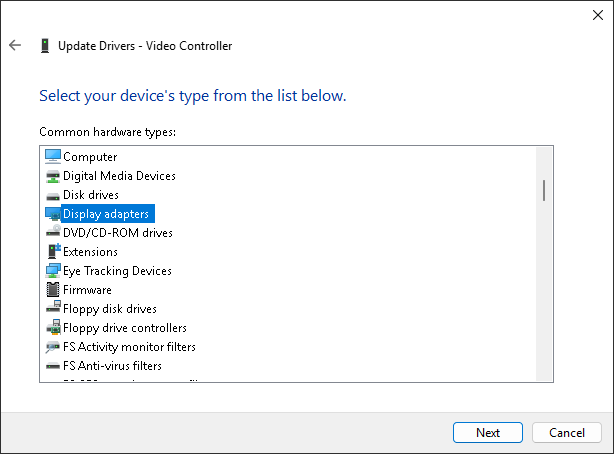
Log in to the server using Remote Desktop, open Device Manager, locate the graphics card, select "Update Driver," and choose `Red Hat VirtIO GPU DOD controller` from the list. There's no need to download the drivers in advance.
|
```bash
|
||||||
|
bash reinstall.sh reset
|
||||||
|
```
|
||||||
|
|
||||||

|
## Parameter Format
|
||||||
|
|
||||||

|
|
||||||
|
|
||||||
</details>
|
### --ssh-key
|
||||||
|
|
||||||
## Discussion
|
- `--ssh-key "ssh-rsa ..."`
|
||||||
|
- `--ssh-key "ssh-ed25519 ..."`
|
||||||
|
- `--ssh-key "ecdsa-sha2-nistp256/384/521 ..."`
|
||||||
|
- `--ssh-key http://path/to/public_key`
|
||||||
|
- `--ssh-key github:your_username`
|
||||||
|
- `--ssh-key gitlab:your_username`
|
||||||
|
- `--ssh-key /path/to/public_key`
|
||||||
|
- `--ssh-key C:\path\to\public_key`
|
||||||
|
|
||||||
[](https://github.com/bin456789/reinstall/issues)
|
## How to Use an Old Version
|
||||||
[](https://t.me/reinstall_os)
|
|
||||||
|
According to the Law of Bug Conservation, fixing old bugs often introduces new ones.
|
||||||
|
|
||||||
|
If a new bug occurs, try using an older version to see if it works.
|
||||||
|
|
||||||
|
Go to <https://github.com/bin456789/reinstall/commits/main> and find the old version’s `commit_id` on the right side.
|
||||||
|
|
||||||
|
```bash
|
||||||
|
commit_id=xxxxxxx
|
||||||
|
curl -O https://raw.githubusercontent.com/bin456789/reinstall/$commit_id/reinstall.sh || wget -O ${_##*/} $_
|
||||||
|
sed -i "/^confhome.*main$/s/main/$commit_id/" reinstall.sh
|
||||||
|
bash reinstall.sh ...
|
||||||
|
```
|
||||||
|
|
||||||
## How to Modify the Script for Your Own
|
## How to Modify the Script for Your Own
|
||||||
|
|
||||||
@ -505,8 +601,6 @@ Log in to the server using Remote Desktop, open Device Manager, locate the graph
|
|||||||
|
|
||||||
## Thanks
|
## Thanks
|
||||||
|
|
||||||
[](https://github.com/sponsors/bin456789)
|
|
||||||
|
|
||||||
Thanks to the following businesses for providing free servers.
|
Thanks to the following businesses for providing free servers.
|
||||||
|
|
||||||
[](https://www.oracle.com/cloud/)
|
[](https://www.oracle.com/cloud/)
|
||||||
|
|||||||
318
README.md
318
README.md
@ -4,25 +4,42 @@
|
|||||||
|
|
||||||
[](https://app.codacy.com/gh/bin456789/reinstall/dashboard)
|
[](https://app.codacy.com/gh/bin456789/reinstall/dashboard)
|
||||||
[](https://www.codefactor.io/repository/github/bin456789/reinstall)
|
[](https://www.codefactor.io/repository/github/bin456789/reinstall)
|
||||||
[](https://github.com/XAMPPRocky/tokei_rs)
|
[](https://github.com/aschey/vercel-tokei)
|
||||||
[](https://t.me/reinstall_os)
|
<!-- [](https://github.com/XAMPPRocky/tokei_rs) -->
|
||||||
[](https://github.com/sponsors/bin456789)
|
|
||||||
|
|
||||||
一键重装脚本 [English](README.en.md)
|
一键 VPS 系统重装脚本 [English](README.en.md)
|
||||||
|
|
||||||
[](https://github.com/sponsors/bin456789)
|
## 介绍
|
||||||
|
|
||||||
## 亮点
|
- 一键重装到 Linux,支持 19 种常见发行版
|
||||||
|
- 一键重装到 Windows,使用官方原版 ISO 而非自制镜像,脚本支持自动查找 ISO 链接、自动安装 `VirtIO` 等公有云驱动
|
||||||
- 一键安装 Linux,支持 19 种常见发行版
|
|
||||||
- 一键安装 Windows,使用官方 ISO 安装而非自制镜像,脚本会自动获取 ISO 链接、自动安装 Virtio 等常见驱动
|
|
||||||
- 支持任意方向重装,即 `Linux to Linux`、`Linux to Windows`、`Windows to Windows`、`Windows to Linux`
|
- 支持任意方向重装,即 `Linux to Linux`、`Linux to Windows`、`Windows to Windows`、`Windows to Linux`
|
||||||
- 无需填写 IP 参数,自动识别动静态,支持 `/32`、`/128`、`网关不在子网范围内`、`纯 IPv6`、`双网卡`
|
- 自动设置 IP,智能设置动静态,支持 `/32`、`/128`、`网关不在子网范围内`、`纯 IPv6`、`IPv4/IPv6 在不同的网卡`
|
||||||
- 专门适配低配小鸡,比官方 netboot 需要更少的内存
|
- 专门适配低配小鸡,比官方 netboot 需要更少的内存
|
||||||
- 全程用分区表 ID 识别硬盘,确保不会写错硬盘
|
- 全程用分区表 ID 识别硬盘,确保不会写错硬盘
|
||||||
- 支持 BIOS、EFI 引导,支持 ARM 服务器
|
- 支持 BIOS、EFI 引导,支持 ARM 服务器
|
||||||
- 不含自制包,所有资源均实时从镜像源获得
|
- 不含自制包,所有资源均实时从镜像源获得
|
||||||
|
|
||||||
|
如果帮到你,可以请我喝奶茶。
|
||||||
|
[](https://github.com/sponsors/bin456789)
|
||||||
|
|
||||||
|
[](https://github.com/sponsors/bin456789)
|
||||||
|
|
||||||
|
### 反馈
|
||||||
|
|
||||||
|
[](https://github.com/bin456789/reinstall/issues)
|
||||||
|
[](https://t.me/reinstall_os)
|
||||||
|
|
||||||
|
## 快速开始
|
||||||
|
|
||||||
|
- [下载](#下载当前系统是--linux)
|
||||||
|
- [功能 1. 一键重装到 Linux](#功能-1-安装--linux)
|
||||||
|
- [功能 2. 一键 DD Raw 镜像到硬盘](#功能-2-dd-raw-镜像到硬盘)
|
||||||
|
- [功能 3. 一键引导到 Alpine Live OS 内存系统](#功能-3-重启到--alpine-live-os内存系统)
|
||||||
|
- [功能 4. 一键引导到 netboot.xyz](#功能-4-重启到--netbootxyz)
|
||||||
|
- [功能 5. 一键重装到 Windows](#功能-5-安装--windows-iso)
|
||||||
|
- [取消重装](#取消重装)
|
||||||
|
|
||||||
## 系统要求
|
## 系统要求
|
||||||
|
|
||||||
原系统可以是表格中的任意系统
|
原系统可以是表格中的任意系统
|
||||||
@ -31,22 +48,22 @@
|
|||||||
|
|
||||||
| 系统 | 版本 | 内存 | 硬盘 |
|
| 系统 | 版本 | 内存 | 硬盘 |
|
||||||
| ---------------------------------------------------------------------------------------------------------------------------------------------------------------------------------------------------------------------------------------------------------------------------------------------------------------------------------------------------------------------- | ------------------------------------- | --------- | ------------ |
|
| ---------------------------------------------------------------------------------------------------------------------------------------------------------------------------------------------------------------------------------------------------------------------------------------------------------------------------------------------------------------------- | ------------------------------------- | --------- | ------------ |
|
||||||
| <img width="16" height="16" src="https://www.alpinelinux.org/alpine-logo.ico" /> Alpine | 3.19, 3.20, 3.21, 3.22 | 256 MB | 1 GB |
|
| <img width="16" height="16" src="https://www.alpinelinux.org/alpine-logo.ico" /> Alpine | 3.20, 3.21, 3.22, 3.23 | 256 MB | 1 GB |
|
||||||
| <img width="16" height="16" src="https://www.debian.org/favicon.ico" /> Debian | 9, 10, 11, 12 | 256 MB | 1 ~ 1.5 GB ^ |
|
| <img width="16" height="16" src="https://www.debian.org/favicon.ico" /> Debian | 9, 10, 11, 12, 13 | 256 MB | 1 ~ 1.5 GB ^ |
|
||||||
| <img width="16" height="16" src="https://github.com/bin456789/reinstall/assets/7548515/f74b3d5b-085f-4df3-bcc9-8a9bd80bb16d" /> Kali | 滚动 | 256 MB | 1 ~ 1.5 GB ^ |
|
| <img width="16" height="16" src="https://github.com/bin456789/reinstall/assets/7548515/f74b3d5b-085f-4df3-bcc9-8a9bd80bb16d" /> Kali | 滚动 | 256 MB | 1 ~ 1.5 GB ^ |
|
||||||
| <img width="16" height="16" src="https://documentation.ubuntu.com/server/_static/favicon.png" /> Ubuntu | 16.04 LTS - 24.04 LTS, 25.04 | 512 MB \* | 2 GB |
|
| <img width="16" height="16" src="https://documentation.ubuntu.com/server/_static/favicon.png" /> Ubuntu | 16.04 LTS - 24.04 LTS, 25.10 | 512 MB \* | 2 GB |
|
||||||
| <img width="16" height="16" src="https://img.alicdn.com/imgextra/i1/O1CN01oJnJZg1yK4RzI4Rx2_!!6000000006559-2-tps-118-118.png" /> Anolis | 7, 8, 23 | 512 MB \* | 5 GB |
|
| <img width="16" height="16" src="https://img.alicdn.com/imgextra/i1/O1CN01oJnJZg1yK4RzI4Rx2_!!6000000006559-2-tps-118-118.png" /> Anolis | 7, 8, 23 | 512 MB \* | 5 GB |
|
||||||
| <img width="16" height="16" src="https://www.redhat.com/favicon.ico" /> RHEL <img width="16" height="16" src="https://almalinux.org/fav/favicon.ico" /> AlmaLinux <img width="16" height="16" src="https://rockylinux.org/favicon.png" /> Rocky <img width="16" height="16" src="https://www.oracle.com/asset/web/favicons/favicon-32.png" /> Oracle | 8, 9, 10 (如果有) | 512 MB \* | 5 GB |
|
| <img width="16" height="16" src="https://www.redhat.com/favicon.ico" /> RHEL <img width="16" height="16" src="https://almalinux.org/fav/favicon.ico" /> AlmaLinux <img width="16" height="16" src="https://rockylinux.org/favicon.png" /> Rocky <img width="16" height="16" src="https://www.oracle.com/asset/web/favicons/favicon-32.png" /> Oracle | 8, 9, 10 | 512 MB \* | 5 GB |
|
||||||
| <img width="16" height="16" src="https://opencloudos.org/qq.ico" /> OpenCloudOS | 8, 9, Stream 23 | 512 MB \* | 5 GB |
|
| <img width="16" height="16" src="https://opencloudos.org/qq.ico" /> OpenCloudOS | 8, 9, Stream 23 | 512 MB \* | 5 GB |
|
||||||
| <img width="16" height="16" src="https://www.centos.org/assets/icons/favicon.svg" /> CentOS Stream | 9, 10 | 512 MB \* | 5 GB |
|
| <img width="16" height="16" src="https://www.centos.org/assets/icons/favicon.svg" /> CentOS Stream | 9, 10 | 512 MB \* | 5 GB |
|
||||||
| <img width="16" height="16" src="https://fedoraproject.org/favicon.ico" /> Fedora | 41, 42 | 512 MB \* | 5 GB |
|
| <img width="16" height="16" src="https://fedoraproject.org/favicon.ico" /> Fedora | 42, 43 | 512 MB \* | 5 GB |
|
||||||
| <img width="16" height="16" src="https://www.openeuler.org/favicon.ico" /> openEuler | 20.03 LTS - 24.03 LTS, 25.03 | 512 MB \* | 5 GB |
|
| <img width="16" height="16" src="https://www.openeuler.org/favicon.ico" /> openEuler | 20.03 LTS - 24.03 LTS, 25.09 | 512 MB \* | 5 GB |
|
||||||
| <img width="16" height="16" src="https://static.opensuse.org/favicon.ico" /> openSUSE | Leap 15.6, Tumbleweed (滚动) | 512 MB \* | 5 GB |
|
| <img width="16" height="16" src="https://static.opensuse.org/favicon.ico" /> openSUSE | Leap 15.6, 16.0, Tumbleweed (滚动) | 512 MB \* | 5 GB |
|
||||||
| <img width="16" height="16" src="https://nixos.org/favicon.svg" /> NixOS | 25.05 | 512 MB | 5 GB |
|
| <img width="16" height="16" src="https://nixos.org/favicon.svg" /> NixOS | 25.11 | 512 MB | 5 GB |
|
||||||
| <img width="16" height="16" src="https://archlinux.org/static/favicon.png" /> Arch | 滚动 | 512 MB | 5 GB |
|
| <img width="16" height="16" src="https://archlinux.org/static/favicon.png" /> Arch | 滚动 | 512 MB | 5 GB |
|
||||||
| <img width="16" height="16" src="https://www.gentoo.org/assets/img/logo/gentoo-g.png" /> Gentoo | 滚动 | 512 MB | 5 GB |
|
| <img width="16" height="16" src="https://www.gentoo.org/assets/img/logo/gentoo-g.png" /> Gentoo | 滚动 | 512 MB | 5 GB |
|
||||||
| <img width="16" height="16" src="https://aosc.io/assets/distros/aosc-os.svg" /> 安同 OS | 滚动 | 512 MB | 5 GB |
|
| <img width="16" height="16" src="https://aosc.io/distros/aosc-os.svg" /> 安同 OS | 滚动 | 512 MB | 5 GB |
|
||||||
| <img width="16" height="16" src="https://www.fnnas.com/favicon.ico" /> 飞牛 fnOS | 公测 | 512 MB | 8 GB |
|
| <img width="16" height="16" src="https://www.fnnas.com/favicon.ico" /> 飞牛 fnOS | 1 | 512 MB | 8 GB |
|
||||||
| <img width="16" height="16" src="https://blogs.windows.com/wp-content/uploads/prod/2022/09/cropped-Windows11IconTransparent512-32x32.png" /> Windows (DD) | 任何 | 512 MB | 取决于镜像 |
|
| <img width="16" height="16" src="https://blogs.windows.com/wp-content/uploads/prod/2022/09/cropped-Windows11IconTransparent512-32x32.png" /> Windows (DD) | 任何 | 512 MB | 取决于镜像 |
|
||||||
| <img width="16" height="16" src="https://blogs.windows.com/wp-content/uploads/prod/2022/09/cropped-Windows11IconTransparent512-32x32.png" /> Windows (ISO) | Vista, 7, 8.x (Server 2008 - 2012 R2) | 512 MB | 25 GB |
|
| <img width="16" height="16" src="https://blogs.windows.com/wp-content/uploads/prod/2022/09/cropped-Windows11IconTransparent512-32x32.png" /> Windows (ISO) | Vista, 7, 8.x (Server 2008 - 2012 R2) | 512 MB | 25 GB |
|
||||||
| <img width="16" height="16" src="https://blogs.windows.com/wp-content/uploads/prod/2022/09/cropped-Windows11IconTransparent512-32x32.png" /> Windows (ISO) | 10, 11 (Server 2016 - 2025) | 1 GB | 25 GB |
|
| <img width="16" height="16" src="https://blogs.windows.com/wp-content/uploads/prod/2022/09/cropped-Windows11IconTransparent512-32x32.png" /> Windows (ISO) | 10, 11 (Server 2016 - 2025) | 1 GB | 25 GB |
|
||||||
@ -56,6 +73,13 @@
|
|||||||
^ 表示需要 256 MB 内存 + 1.5 GB 硬盘,或 512 MB 内存 + 1 GB 硬盘
|
^ 表示需要 256 MB 内存 + 1.5 GB 硬盘,或 512 MB 内存 + 1 GB 硬盘
|
||||||
|
|
||||||
> [!WARNING]
|
> [!WARNING]
|
||||||
|
>
|
||||||
|
> 本脚本理论上支持独服和 PC
|
||||||
|
>
|
||||||
|
> 但如果能使用 IPMI 或 U 盘,则不建议使用本脚本
|
||||||
|
|
||||||
|
> [!WARNING]
|
||||||
|
>
|
||||||
> ❌ 本脚本不支持 OpenVZ、LXC 虚拟机
|
> ❌ 本脚本不支持 OpenVZ、LXC 虚拟机
|
||||||
>
|
>
|
||||||
> 请改用 <https://github.com/LloydAsp/OsMutation>
|
> 请改用 <https://github.com/LloydAsp/OsMutation>
|
||||||
@ -65,13 +89,13 @@
|
|||||||
国外服务器:
|
国外服务器:
|
||||||
|
|
||||||
```bash
|
```bash
|
||||||
curl -O https://raw.githubusercontent.com/bin456789/reinstall/main/reinstall.sh || wget -O reinstall.sh $_
|
curl -O https://raw.githubusercontent.com/bin456789/reinstall/main/reinstall.sh || wget -O ${_##*/} $_
|
||||||
```
|
```
|
||||||
|
|
||||||
国内服务器:
|
国内服务器:
|
||||||
|
|
||||||
```bash
|
```bash
|
||||||
curl -O https://cnb.cool/bin456789/reinstall/-/git/raw/main/reinstall.sh || wget -O reinstall.sh $_
|
curl -O https://cnb.cool/bin456789/reinstall/-/git/raw/main/reinstall.sh || wget -O ${_##*/} $_
|
||||||
```
|
```
|
||||||
|
|
||||||
## 下载(当前系统是 <img width="20" height="20" src="https://blogs.windows.com/wp-content/uploads/prod/2022/09/cropped-Windows11IconTransparent512-32x32.png" /> Windows)
|
## 下载(当前系统是 <img width="20" height="20" src="https://blogs.windows.com/wp-content/uploads/prod/2022/09/cropped-Windows11IconTransparent512-32x32.png" /> Windows)
|
||||||
@ -113,61 +137,62 @@ certutil -urlcache -f -split https://cnb.cool/bin456789/reinstall/-/git/raw/main
|
|||||||
|
|
||||||
- Linux 下运行 `bash reinstall.sh ...`
|
- Linux 下运行 `bash reinstall.sh ...`
|
||||||
- Windows 下先运行 `cmd`,再运行 `reinstall.bat ...`
|
- Windows 下先运行 `cmd`,再运行 `reinstall.bat ...`
|
||||||
- 如果参数中的链接包含特殊字符,要用 `""` 将链接包起来,不能用 `''`
|
- 如果参数中的链接包含特殊字符,要用 `""` 将链接包裹起来,不能用 `''`
|
||||||
|
|
||||||
### 功能 1: 安装 <img width="16" height="16" src="https://www.kernel.org/theme/images/logos/favicon.png" /> Linux
|
### 功能 1: 安装 <img width="16" height="16" src="https://www.kernel.org/theme/images/logos/favicon.png" /> Linux
|
||||||
|
|
||||||
- 用户名 `root` 默认密码 `123@@@`
|
> [!CAUTION]
|
||||||
|
>
|
||||||
|
> 此功能会清除当前系统**整个硬盘**的全部数据(包含其它分区)!
|
||||||
|
>
|
||||||
|
> 如果不小心运行了脚本,可以在重启前运行 `bash reinstall.sh reset` 取消重装
|
||||||
|
|
||||||
|
- 用户名为 `root`,脚本会提示输入密码,不输入则使用随机密码
|
||||||
- 安装最新版可不输入版本号
|
- 安装最新版可不输入版本号
|
||||||
- 最大化利用磁盘空间:不含 boot 分区(Fedora 例外),不含 swap 分区
|
- 最大化利用磁盘空间:不含 boot 分区(Fedora 例外),不含 swap 分区
|
||||||
- 自动根据机器类型选择不同的优化内核,例如 `Cloud`、`HWE` 内核
|
- 自动根据机器类型选择不同的优化内核,例如 `Cloud`、`HWE` 内核
|
||||||
- 安装 Red Hat 时需填写 <https://access.redhat.com/downloads/content/rhel> 得到的 `qcow2` 镜像链接,也可以安装其它类 RHEL 系统,例如 `Alibaba Cloud Linux` 和 `TencentOS Server`
|
- 安装 Red Hat 时需填写 <https://access.redhat.com/downloads/content/rhel> 得到的 `qcow2` 镜像链接,也可以安装其它类 RHEL 系统的 `qcow2`,例如 `Alibaba Cloud Linux` 和 `TencentOS Server`
|
||||||
- 重装后如需修改 SSH 端口或者改成密钥登录,注意还要修改 `/etc/ssh/sshd_config.d/` 里面的文件
|
- 重装后如需修改 SSH 端口或者改成密钥登录,注意还要修改 `/etc/ssh/sshd_config.d/` 里面的文件
|
||||||
|
|
||||||
```bash
|
```bash
|
||||||
bash reinstall.sh anolis 7|8|23
|
bash reinstall.sh anolis 7|8|23
|
||||||
rocky 8|9|10
|
rocky 8|9|10
|
||||||
oracle 8|9
|
oracle 8|9|10
|
||||||
almalinux 8|9|10
|
almalinux 8|9|10
|
||||||
opencloudos 8|9|23
|
opencloudos 8|9|23
|
||||||
centos 9|10
|
centos 9|10
|
||||||
fedora 41|42
|
fnos 1
|
||||||
nixos 25.05
|
nixos 25.11
|
||||||
debian 9|10|11|12
|
fedora 42|43
|
||||||
opensuse 15.6|tumbleweed
|
debian 9|10|11|12|13
|
||||||
alpine 3.19|3.20|3.21|3.22
|
alpine 3.20|3.21|3.22|3.23
|
||||||
openeuler 20.03|22.03|24.03|25.03
|
opensuse 15.6|16.0|tumbleweed
|
||||||
ubuntu 16.04|18.04|20.04|22.04|24.04|25.04 [--minimal]
|
openeuler 20.03|22.03|24.03|25.09
|
||||||
|
ubuntu 16.04|18.04|20.04|22.04|24.04|25.10 [--minimal]
|
||||||
kali
|
kali
|
||||||
arch
|
arch
|
||||||
gentoo
|
gentoo
|
||||||
aosc
|
aosc
|
||||||
fnos
|
|
||||||
redhat --img="http://access.cdn.redhat.com/xxx.qcow2"
|
redhat --img="http://access.cdn.redhat.com/xxx.qcow2"
|
||||||
```
|
```
|
||||||
|
|
||||||
#### 可选参数
|
#### 可选参数
|
||||||
|
|
||||||
- `--password PASSWORD` 设置密码
|
- `--password PASSWORD` 设置密码
|
||||||
- `--ssh-key KEY` 设置 SSH 登录公钥,支持以下格式。当使用公钥时,密码为空
|
- `--ssh-key KEY` 设置 SSH 登录公钥,[格式如下](#--ssh-key)。当使用公钥时,密码为空
|
||||||
- `--ssh-key "ssh-rsa ..."`
|
|
||||||
- `--ssh-key "ssh-ed25519 ..."`
|
|
||||||
- `--ssh-key "ecdsa-sha2-nistp256/384/521 ..."`
|
|
||||||
- `--ssh-key http://path/to/public_key`
|
|
||||||
- `--ssh-key github:your_username`
|
|
||||||
- `--ssh-key gitlab:your_username`
|
|
||||||
- `--ssh-key /path/to/public_key`
|
|
||||||
- `--ssh-key C:\path\to\public_key`
|
|
||||||
- `--ssh-port PORT` 修改 SSH 端口(安装期间观察日志用,也作用于新系统)
|
- `--ssh-port PORT` 修改 SSH 端口(安装期间观察日志用,也作用于新系统)
|
||||||
- `--web-port PORT` 修改 Web 端口(安装期间观察日志用)
|
- `--web-port PORT` 修改 Web 端口(安装期间观察日志用)
|
||||||
- `--frpc-toml /path/to/frpc.toml` 添加 frpc 内网穿透
|
- `--frpc-config PATH` 添加 frpc 内网穿透,参数填配置文件的本地路径或 HTTP 链接
|
||||||
- `--hold 2` 安装结束后不重启,此时可以 SSH 登录修改系统内容,系统挂载在 `/os` (此功能不支持 Debian/Kali)
|
- `--hold 1` 仅重启到安装环境,不运行安装,用于 SSH 登录验证网络连通性
|
||||||
|
- `--hold 2` 安装结束后不重启,用于 SSH 登录修改系统内容,Debian/Kali 会挂载在 `/target`,其它系统会挂载在 `/os`
|
||||||
|
|
||||||
> [!TIP]
|
> [!TIP]
|
||||||
> 安装 Debian/Kali 时,x86 可通过商家后台 VNC 查看安装进度,ARM 可通过串行控制台查看安装进度。
|
|
||||||
>
|
>
|
||||||
> 安装其它系统时,可通过多种方式(SSH、HTTP 80 端口、商家后台 VNC、串行控制台)查看安装进度。
|
> 可通过多种方式(SSH、HTTP 80 端口、商家后台 VNC、串行控制台)查看安装进度。
|
||||||
> <br />即使安装过程出错,也能通过 SSH 运行 `/trans.sh alpine` 安装到 Alpine。
|
>
|
||||||
|
> 即使安装过程出错,也能连接 SSH 手动救砖。
|
||||||
|
>
|
||||||
|
> 目标系统非 Debian/Kali 时,可以运行 `/trans.sh alpine` 自动救砖成 Alpine 系统。
|
||||||
|
|
||||||
<details>
|
<details>
|
||||||
|
|
||||||
@ -201,9 +226,15 @@ bash reinstall.sh ubuntu --installer
|
|||||||
|
|
||||||
</details>
|
</details>
|
||||||
|
|
||||||
### 功能 2: DD
|
### 功能 2: DD RAW 镜像到硬盘
|
||||||
|
|
||||||
- 支持 `raw` `vhd` 格式的镜像(未压缩,或者压缩成 `.gz` `.xz` `.zst` `.tar` `.tar.gz` `.tar.xz` `.tar.zst`)
|
> [!CAUTION]
|
||||||
|
>
|
||||||
|
> 此功能会清除当前系统**整个硬盘**的全部数据(包含其它分区)!
|
||||||
|
>
|
||||||
|
> 如果不小心运行了脚本,可以在重启前运行 `bash reinstall.sh reset` 取消重装
|
||||||
|
|
||||||
|
- 支持 `raw` 和固定大小的 `vhd` 镜像。未压缩或者压缩成 `.gz` `.xz` `.zst` `.tar` `.tar.gz` `.tar.xz` `.tar.zst`
|
||||||
- DD Windows 镜像时,会自动扩展系统盘,静态 IP 的机器会配置好 IP,可能首次开机几分钟后才生效
|
- DD Windows 镜像时,会自动扩展系统盘,静态 IP 的机器会配置好 IP,可能首次开机几分钟后才生效
|
||||||
- DD Linux 镜像时,**不会**修改镜像的任何内容
|
- DD Linux 镜像时,**不会**修改镜像的任何内容
|
||||||
|
|
||||||
@ -217,42 +248,68 @@ bash reinstall.sh dd --img "https://example.com/xxx.xz"
|
|||||||
- `--rdp-port PORT` 修改 RDP 端口 (仅限 DD Windows)
|
- `--rdp-port PORT` 修改 RDP 端口 (仅限 DD Windows)
|
||||||
- `--ssh-port PORT` 修改 SSH 端口(安装期间观察日志用)
|
- `--ssh-port PORT` 修改 SSH 端口(安装期间观察日志用)
|
||||||
- `--web-port PORT` 修改 Web 端口(安装期间观察日志用)
|
- `--web-port PORT` 修改 Web 端口(安装期间观察日志用)
|
||||||
- `--frpc-toml /path/to/frpc.toml` 添加 frpc 内网穿透(仅限 DD Windows)
|
- `--frpc-config PATH` 添加 frpc 内网穿透(仅限 DD Windows),参数填配置文件的本地路径或 HTTP 链接
|
||||||
- `--hold 2` DD 结束后不重启,此时可以 SSH 登录修改系统内容,Windows 系统会挂载在 `/os`,Linux 系统**不会**自动挂载
|
- `--cloud-data PATH_OR_URL` 为 DD Linux 镜像注入 cloud-init NoCloud 配置(仅限 DD Linux)
|
||||||
|
- `--hold 1` 仅重启到安装环境,不运行安装,用于 SSH 登录验证网络连通性
|
||||||
|
- `--hold 2` DD 结束后不重启,用于 SSH 登录修改系统内容,Windows 系统会挂载在 `/os`,Linux 系统**不会**自动挂载
|
||||||
|
|
||||||
> [!TIP]
|
> [!TIP]
|
||||||
|
>
|
||||||
|
> `--cloud-data` 参数为本地目录或 HTTP 基础 URL,目录须包含 `user-data` 文件,`meta-data`、`network-config` 可选:
|
||||||
|
>
|
||||||
|
> ```
|
||||||
|
> seed/
|
||||||
|
> ├── user-data # 必须
|
||||||
|
> ├── meta-data # 可选
|
||||||
|
> └── network-config # 可选
|
||||||
|
> ```
|
||||||
|
>
|
||||||
|
> ```bash
|
||||||
|
> # 使用本地目录
|
||||||
|
> bash reinstall.sh dd --img "https://example.com/xxx.xz" --cloud-data /path/to/seed/
|
||||||
|
> # 使用 HTTP 目录
|
||||||
|
> bash reinstall.sh dd --img "https://example.com/xxx.xz" --cloud-data "https://example.com/seed/"
|
||||||
|
> ```
|
||||||
|
|
||||||
|
> [!TIP]
|
||||||
|
>
|
||||||
> 可通过多种方式(SSH、HTTP 80 端口、商家后台 VNC、串行控制台)查看安装进度。
|
> 可通过多种方式(SSH、HTTP 80 端口、商家后台 VNC、串行控制台)查看安装进度。
|
||||||
> <br />即使安装过程出错,也能通过 SSH 运行 `/trans.sh alpine` 安装到 Alpine。
|
>
|
||||||
|
> 即使安装过程出错,也能连接 SSH 手动救砖
|
||||||
|
>
|
||||||
|
> 也可以运行 `/trans.sh alpine` 自动救砖成 Alpine 系统。
|
||||||
|
|
||||||
### 功能 3: 重启到 <img width="16" height="16" src="https://www.alpinelinux.org/alpine-logo.ico" /> Alpine Live OS(内存系统)
|
### 功能 3: 重启到 <img width="16" height="16" src="https://www.alpinelinux.org/alpine-logo.ico" /> Alpine Live OS(内存系统)
|
||||||
|
|
||||||
- 可用 ssh 连接,进行备份/恢复硬盘、手动 DD、修改分区、手动安装 Alpine/Arch/Gentoo 等操作
|
- 可用 ssh 连接,进行备份/恢复硬盘、手动 DD、修改分区、手动安装 Alpine 等操作
|
||||||
- 用户名 `root` 默认密码 `123@@@`
|
- 用户名为 `root`,脚本会提示输入密码,不输入则使用随机密码
|
||||||
- 如果手动操作没有破坏原系统,再次重启将回到原系统
|
|
||||||
|
> [!TIP]
|
||||||
|
>
|
||||||
|
> 虽然运行的脚本叫 `reinstall`,但是此功能**不会**删除任何数据和进行自动重装,而是要用户手动操作
|
||||||
|
>
|
||||||
|
> 如果用户手动操作没有破坏原系统,再次重启将回到原系统
|
||||||
|
|
||||||
```bash
|
```bash
|
||||||
bash reinstall.sh alpine --hold=1
|
bash reinstall.sh alpine --hold 1
|
||||||
```
|
```
|
||||||
|
|
||||||
#### 可选参数
|
#### 可选参数
|
||||||
|
|
||||||
- `--password PASSWORD` 设置密码
|
- `--password PASSWORD` 设置密码
|
||||||
- `--ssh-port PORT` 修改 SSH 端口
|
- `--ssh-port PORT` 修改 SSH 端口
|
||||||
- `--ssh-key KEY` 设置 SSH 登录公钥,支持以下格式。当使用公钥时,密码为空
|
- `--ssh-key KEY` 设置 SSH 登录公钥,[格式如下](#--ssh-key)。当使用公钥时,密码为空
|
||||||
- `--ssh-key "ssh-rsa ..."`
|
- `--frpc-config PATH` 添加 frpc 内网穿透,参数填配置文件的本地路径或 HTTP 链接
|
||||||
- `--ssh-key "ssh-ed25519 ..."`
|
|
||||||
- `--ssh-key "ecdsa-sha2-nistp256/384/521 ..."`
|
|
||||||
- `--ssh-key http://path/to/public_key`
|
|
||||||
- `--ssh-key github:your_username`
|
|
||||||
- `--ssh-key gitlab:your_username`
|
|
||||||
- `--ssh-key /path/to/public_key`
|
|
||||||
- `--ssh-key C:\path\to\public_key`
|
|
||||||
- `--frpc-toml /path/to/frpc.toml` 添加 frpc 内网穿透
|
|
||||||
|
|
||||||
### 功能 4: 重启到 <img width="16" height="16" src="https://netboot.xyz/img/favicon.ico" /> netboot.xyz
|
### 功能 4: 重启到 <img width="16" height="16" src="https://netboot.xyz/img/favicon.ico" /> netboot.xyz
|
||||||
|
|
||||||
- 可使用商家后台 VNC 手动安装 [更多系统](https://github.com/netbootxyz/netboot.xyz?tab=readme-ov-file#what-operating-systems-are-currently-available-on-netbootxyz)
|
- 可使用商家后台 VNC 手动安装 [更多系统](https://github.com/netbootxyz/netboot.xyz?tab=readme-ov-file#what-operating-systems-are-currently-available-on-netbootxyz)
|
||||||
- 如果手动操作没有破坏原系统,再次重启将回到原系统
|
|
||||||
|
> [!TIP]
|
||||||
|
>
|
||||||
|
> 虽然运行的脚本叫 `reinstall`,但是此功能**不会**删除任何数据和进行自动重装,而是要用户手动操作
|
||||||
|
>
|
||||||
|
> 如果用户手动操作没有破坏原系统,再次重启将回到原系统
|
||||||
|
|
||||||
```bash
|
```bash
|
||||||
bash reinstall.sh netboot.xyz
|
bash reinstall.sh netboot.xyz
|
||||||
@ -264,24 +321,31 @@ bash reinstall.sh netboot.xyz
|
|||||||
|
|
||||||

|

|
||||||
|
|
||||||
- 用户名 `administrator` 默认密码 `123@@@`
|
> [!CAUTION]
|
||||||
|
>
|
||||||
|
> 此功能会清除当前系统**整个硬盘**的全部数据(包含其它分区)!
|
||||||
|
>
|
||||||
|
> 如果不小心运行了脚本,可以在重启前运行 `bash reinstall.sh reset` 取消重装
|
||||||
|
|
||||||
|
- 用户名为 `administrator`,脚本会提示输入密码,不输入则使用随机密码
|
||||||
- 如果远程登录失败,可以尝试使用用户名 `.\administrator`
|
- 如果远程登录失败,可以尝试使用用户名 `.\administrator`
|
||||||
- 静态机器会自动配置好 IP,可能首次开机几分钟后才生效
|
- 静态机器会自动配置好 IP,可能首次开机几分钟后才生效
|
||||||
- 支持所有语言
|
- 支持任意语言的 ISO
|
||||||
|
- 支持绕过 Windows 11 硬件限制
|
||||||
|
|
||||||
#### 支持的系统
|
#### 支持的系统
|
||||||
|
|
||||||
- Windows (Vista ~ 11)
|
- Windows (Vista ~ 11)
|
||||||
- Windows Server (2008 ~ 2025)
|
- Windows Server (2008 ~ 2025)
|
||||||
- Windows Server Essentials \*
|
- Windows Server Essentials
|
||||||
- Windows Server (Semi) Annual Channel \*
|
- Windows Server (Semi) Annual Channel
|
||||||
- Hyper-V Server \*
|
- Hyper-V Server
|
||||||
- Azure Stack HCI \*
|
- Azure Local (Azure Stack HCI)
|
||||||
|
|
||||||
#### 方法 1: 让脚本自动查找 ISO
|
#### 方法 1: 让脚本自动查找 ISO
|
||||||
|
|
||||||
- 脚本会从 <https://massgrave.dev/genuine-installation-media> 查找 ISO,该网站专门提供官方 ISO 下载
|
- 脚本会从 <https://massgrave.dev/genuine-installation-media> 查找 ISO,该网站专门提供官方 ISO 下载
|
||||||
- 上面带 \* 的系统不支持自动查找 ISO
|
- 只支持查找 Windows 10, 11, Server 2019, 2022, 2025 的 ISO
|
||||||
|
|
||||||
```bash
|
```bash
|
||||||
bash reinstall.sh windows \
|
bash reinstall.sh windows \
|
||||||
@ -367,7 +431,6 @@ bash reinstall.sh windows \
|
|||||||
- <https://www.microsoft.com/software-download/windows11>
|
- <https://www.microsoft.com/software-download/windows11>
|
||||||
- <https://www.microsoft.com/software-download/windows11arm64>
|
- <https://www.microsoft.com/software-download/windows11arm64>
|
||||||
- 评估版
|
- 评估版
|
||||||
- <https://www.microsoft.com/evalcenter/download-windows-10-enterprise>
|
|
||||||
- <https://www.microsoft.com/evalcenter/download-windows-11-enterprise>
|
- <https://www.microsoft.com/evalcenter/download-windows-11-enterprise>
|
||||||
- <https://www.microsoft.com/evalcenter/download-windows-11-iot-enterprise-ltsc-eval>
|
- <https://www.microsoft.com/evalcenter/download-windows-11-iot-enterprise-ltsc-eval>
|
||||||
- <https://www.microsoft.com/evalcenter/download-windows-server-2012-r2>
|
- <https://www.microsoft.com/evalcenter/download-windows-server-2012-r2>
|
||||||
@ -386,22 +449,23 @@ bash reinstall.sh windows \
|
|||||||
- `--password PASSWORD` 设置密码
|
- `--password PASSWORD` 设置密码
|
||||||
- `--allow-ping` 设置 Windows 防火墙允许被 Ping
|
- `--allow-ping` 设置 Windows 防火墙允许被 Ping
|
||||||
- `--rdp-port PORT` 更改 RDP 端口
|
- `--rdp-port PORT` 更改 RDP 端口
|
||||||
- `--ssh-port PORT` 修改 SSH 端口(安装期间观察日志用)
|
- `--ssh-port PORT` 修改 SSH 端口(仅安装期间观察日志用)
|
||||||
- `--web-port PORT` 修改 Web 端口(安装期间观察日志用)
|
- `--web-port PORT` 修改 Web 端口(仅安装期间观察日志用)
|
||||||
- `--add-driver INF_OR_DIR` 添加额外驱动,填写 .inf 路径,或者 .inf 所在的文件夹
|
- `--add-driver INF_OR_DIR` 添加额外驱动,填写 .inf 路径,或者 .inf 所在的文件夹
|
||||||
- 需先下载驱动到本地
|
- 需先下载驱动到当前系统
|
||||||
- 可多次设置该参数以添加不同的驱动
|
- 可多次设置该参数以添加不同的驱动
|
||||||
- `--frpc-toml /path/to/frpc.toml` 添加 frpc 内网穿透
|
- `--frpc-config PATH` 添加 frpc 内网穿透,参数填配置文件的本地路径或 HTTP 链接
|
||||||
- `--hold 2` 在进入 Windows 官方安装程序之前,可以 SSH 登录修改硬盘内容,硬盘挂载在 `/os`
|
- `--hold 1` 仅重启到安装环境,不运行安装,用于 SSH 登录验证网络连通性
|
||||||
|
- `--hold 2` 用于在进入 Windows 官方安装程序之前,SSH 登录修改 `boot.wim`、`install.wim` 或者其它内容,硬盘挂载在 `/os`
|
||||||
|
|
||||||
#### 以下驱动会自动按需下载安装,无需手动添加
|
#### 以下驱动会自动按需下载安装,无需手动添加
|
||||||
|
|
||||||
- Virtio ([Virtio][virtio-virtio], [阿里云][virtio-aliyun], [腾讯云][virtio-qcloud], [GCP][virtio-gcp])
|
- VirtIO ([社区版][virtio-virtio], [阿里云][virtio-aliyun], [腾讯云][virtio-qcloud], [GCP][virtio-gcp])
|
||||||
- XEN ([~~XEN~~][xen-xen] (未签名), [Citrix][xen-citrix], [AWS][xen-aws])
|
- XEN ([~~社区版~~][xen-xen] (未签名), [Citrix][xen-citrix], [AWS][xen-aws])
|
||||||
- AWS ([ENA 网卡][aws-ena], [NVME 存储控制器][aws-nvme])
|
- AWS ([ENA 网卡][aws-ena], [NVME 存储控制器][aws-nvme])
|
||||||
- GCP ([gVNIC 网卡][gcp-gvnic], [GGA 显卡][gcp-gga])
|
- GCP ([gVNIC 网卡][gcp-gvnic], [GGA 显卡][gcp-gga])
|
||||||
- Azure ([MANA 网卡][azure-mana])
|
- Azure ([MANA 网卡][azure-mana])
|
||||||
- Intel ([VMD 存储控制器][intel-vmd], 网卡: [7][intel-nic-7], [8][intel-nic-8], [8.1][intel-nic-8.1], [10][intel-nic-10], [11][intel-nic-11], [2008 R2][intel-nic-2008-r2], [2012][intel-nic-2012], [2012 R2][intel-nic-2012-r2], [2016][intel-nic-2016], [2019][intel-nic-2019], [2022][intel-nic-2022], [2025][intel-nic-2025])
|
- Intel (VMD 存储控制器: [11代酷睿][intel-vmd-gen11], [12-15代酷睿][intel-vmd-gen12-to-gen15], 网卡: [7][intel-nic-7], [8.x][intel-nic-8.1], [10][intel-nic-10], [11][intel-nic-11], [2008 R2][intel-nic-7], [2012][intel-nic-2012], [2012 R2][intel-nic-2012-r2], [2016][intel-nic-2016], [2019][intel-nic-2019], [2022][intel-nic-2022], [2025][intel-nic-2025])
|
||||||
|
|
||||||
[virtio-virtio]: https://fedorapeople.org/groups/virt/virtio-win/direct-downloads/
|
[virtio-virtio]: https://fedorapeople.org/groups/virt/virtio-win/direct-downloads/
|
||||||
[virtio-aliyun]: https://www.alibabacloud.com/help/ecs/user-guide/install-the-virtio-driver-1
|
[virtio-aliyun]: https://www.alibabacloud.com/help/ecs/user-guide/install-the-virtio-driver-1
|
||||||
@ -415,13 +479,12 @@ bash reinstall.sh windows \
|
|||||||
[gcp-gvnic]: https://cloud.google.com/compute/docs/networking/using-gvnic
|
[gcp-gvnic]: https://cloud.google.com/compute/docs/networking/using-gvnic
|
||||||
[gcp-gga]: https://cloud.google.com/compute/docs/instances/enable-instance-virtual-display
|
[gcp-gga]: https://cloud.google.com/compute/docs/instances/enable-instance-virtual-display
|
||||||
[azure-mana]: https://learn.microsoft.com/azure/virtual-network/accelerated-networking-mana-windows
|
[azure-mana]: https://learn.microsoft.com/azure/virtual-network/accelerated-networking-mana-windows
|
||||||
[intel-vmd]: https://www.intel.com/content/www/us/en/download/849936/intel-rapid-storage-technology-driver-installation-software-with-intel-optane-memory-12th-to-15th-gen-platforms.html
|
[intel-vmd-gen11]: https://www.intel.com/content/www/us/en/download/849933/intel-rapid-storage-technology-driver-installation-software-with-intel-optane-memory-12th-to-13th-gen-platforms.html
|
||||||
|
[intel-vmd-gen12-to-gen15]: https://www.intel.com/content/www/us/en/download/849936/intel-rapid-storage-technology-driver-installation-software-with-intel-optane-memory-12th-to-15th-gen-platforms.html
|
||||||
[intel-nic-7]: https://www.intel.com/content/www/us/en/download/15590/intel-network-adapter-driver-for-windows-7-final-release.html
|
[intel-nic-7]: https://www.intel.com/content/www/us/en/download/15590/intel-network-adapter-driver-for-windows-7-final-release.html
|
||||||
[intel-nic-8]: https://web.archive.org/web/20250501043104/https://www.intel.com/content/www/us/en/download/16765/intel-network-adapter-driver-for-windows-8-final-release.html
|
|
||||||
[intel-nic-8.1]: https://www.intel.com/content/www/us/en/download/17479/intel-network-adapter-driver-for-windows-8-1.html
|
[intel-nic-8.1]: https://www.intel.com/content/www/us/en/download/17479/intel-network-adapter-driver-for-windows-8-1.html
|
||||||
[intel-nic-10]: https://www.intel.com/content/www/us/en/download/18293/intel-network-adapter-driver-for-windows-10.html
|
[intel-nic-10]: https://www.intel.com/content/www/us/en/download/18293/intel-network-adapter-driver-for-windows-10.html
|
||||||
[intel-nic-11]: https://www.intel.com/content/www/us/en/download/727998/intel-network-adapter-driver-for-microsoft-windows-11.html
|
[intel-nic-11]: https://www.intel.com/content/www/us/en/download/727998/intel-network-adapter-driver-for-microsoft-windows-11.html
|
||||||
[intel-nic-2008-r2]: https://www.intel.com/content/www/us/en/download/15591/intel-network-adapter-driver-for-windows-server-2008-r2-final-release.html
|
|
||||||
[intel-nic-2012]: https://www.intel.com/content/www/us/en/download/16789/intel-network-adapter-driver-for-windows-server-2012.html
|
[intel-nic-2012]: https://www.intel.com/content/www/us/en/download/16789/intel-network-adapter-driver-for-windows-server-2012.html
|
||||||
[intel-nic-2012-r2]: https://www.intel.com/content/www/us/en/download/17480/intel-network-adapter-driver-for-windows-server-2012-r2.html
|
[intel-nic-2012-r2]: https://www.intel.com/content/www/us/en/download/17480/intel-network-adapter-driver-for-windows-server-2012-r2.html
|
||||||
[intel-nic-2016]: https://www.intel.com/content/www/us/en/download/18737/intel-network-adapter-driver-for-windows-server-2016.html
|
[intel-nic-2016]: https://www.intel.com/content/www/us/en/download/18737/intel-network-adapter-driver-for-windows-server-2016.html
|
||||||
@ -431,7 +494,7 @@ bash reinstall.sh windows \
|
|||||||
|
|
||||||
#### 如何填写映像名称 `--image-name`
|
#### 如何填写映像名称 `--image-name`
|
||||||
|
|
||||||
通常一个 ISO 会包含多个系统版本,例如家庭版、专业版。映像名称 `--image-name` 就是用来指定要安装的版本,填写时不区分大小写
|
一个 ISO 通常包含多个系统版本,例如家庭版、专业版。因此需要用 `--image-name` 指定要安装的系统版本(映像名称),不区分大小写
|
||||||
|
|
||||||
可以用 DISM、DISM++、Wimlib 等工具查询 ISO 包含的映像名称
|
可以用 DISM、DISM++、Wimlib 等工具查询 ISO 包含的映像名称
|
||||||
|
|
||||||
@ -454,48 +517,81 @@ Windows Server 2025 SERVERDATACENTER
|
|||||||
> Vista (Server 2008) 和 32 位系统可能会缺少驱动
|
> Vista (Server 2008) 和 32 位系统可能会缺少驱动
|
||||||
|
|
||||||
> [!WARNING]
|
> [!WARNING]
|
||||||
> 未开启 CSM 的 EFI 机器,无法安装 Windows 7 (Server 2008 R2)
|
|
||||||
>
|
>
|
||||||
> Hyper-V (Azure) 需选择合适的虚拟机代系 <https://learn.microsoft.com/windows-server/virtualization/hyper-v/plan/should-i-create-a-generation-1-or-2-virtual-machine-in-hyper-v>
|
> 安装 Windows 7 (Server 2008 R2) 时
|
||||||
|
>
|
||||||
|
> 1. EFI 引导的机器要开启 CSM
|
||||||
|
>
|
||||||
|
> 2. Hyper-V (Azure) 需选择第 1 代虚拟机 <https://learn.microsoft.com/windows-server/virtualization/hyper-v/plan/should-i-create-a-generation-1-or-2-virtual-machine-in-hyper-v>
|
||||||
|
|
||||||
> [!WARNING]
|
> [!WARNING]
|
||||||
|
>
|
||||||
> Windows 10 LTSC 2021 中文版镜像 `zh-cn_windows_10_enterprise_ltsc_2021_x64_dvd_033b7312.iso` 的 `wsappx` 进程会长期占用 CPU
|
> Windows 10 LTSC 2021 中文版镜像 `zh-cn_windows_10_enterprise_ltsc_2021_x64_dvd_033b7312.iso` 的 `wsappx` 进程会长期占用 CPU
|
||||||
>
|
>
|
||||||
> 解决方法是更新系统补丁,或者手动安装 `VCLibs` 库 <https://www.google.com/search?q=ltsc+wsappx>
|
> 解决方法是更新系统补丁,或者手动安装 `VCLibs` 库 <https://www.google.com/search?q=ltsc+wsappx>
|
||||||
|
|
||||||
|
> [!WARNING]
|
||||||
|
>
|
||||||
|
> 在 GCP 上安装 `2022年5月` 和之后发布的 Windows ISO,在引导 Windows 安装界面 (PE) 时会不断反复重启。解决方法如下,二选一
|
||||||
|
>
|
||||||
|
> 1. 添加 `--force-boot-mode bios` 参数,脚本将以 `BIOS 引导 + MBR 分区表` 方式安装 Windows
|
||||||
|
>
|
||||||
|
> (可选) 安装完成后用 `MBR2GPT /convert /allowFullOS` 命令转为 `EFI 引导 + GPT 分区表`
|
||||||
|
>
|
||||||
|
> 2. 自制 RAW 镜像并通过 DD 安装
|
||||||
|
|
||||||
#### ARM 安装 Windows 的注意事项
|
#### ARM 安装 Windows 的注意事项
|
||||||
|
|
||||||
大部分 ARM 机器都支持安装最新版 Windows 11
|
大部分 ARM 机器都支持安装最新版 Windows 11
|
||||||
|
|
||||||
安装过程可能会黑屏,串行控制台可能会显示 `ConvertPages: failed to find range`,均不影响正常安装
|
安装过程可能会黑屏,串行控制台可能会显示 `ConvertPages: failed to find range`,均不影响正常安装
|
||||||
|
|
||||||
| 兼容性 | 云服务商 | 实例类型 | 问题 |
|
| 兼容性 | 云服务商 | 实例类型 | 问题 |
|
||||||
| ------ | -------- | ------------- | ---------------------------------------------------------------------------- |
|
| ------ | -------- | ----------------------- | ------------------------------------------ |
|
||||||
| ✔️ | Azure | B2pts_v2 | |
|
| ✔️ | Azure | B2pts_v2 | |
|
||||||
| ✔️ | 阿里云 | g6r, c6r | |
|
| ✔️ | AWS | T4g | |
|
||||||
| ✔️ | 阿里云 | g8y, c8y, r8y | 有几率重启时卡开机 Logo,强制重启即可 |
|
| ✔️ | Scaleway | COPARM1 | |
|
||||||
| ✔️ | AWS | T4g | |
|
| ✔️ | Gcore | | |
|
||||||
| ✔️ | Scaleway | COPARM1 | |
|
| ❔ | 阿里云 | g6r, c6r, g8y, c8y, r8y | 有几率重启时卡开机 Logo,强制重启即可 |
|
||||||
| ✔️ | Gcore | | |
|
| ❔ | 甲骨文云 | A1.Flex | 不一定能安装成功,越新创建的实例越容易成功 |
|
||||||
| ❔ | 甲骨文云 | A1.Flex | 不一定能安装成功,越新创建的实例越容易成功<br />安装后还需要手动加载显卡驱动 |
|
| ❌ | 谷歌云 | t2a | 缺少网卡驱动 |
|
||||||
| ❌ | 谷歌云 | t2a | 缺少网卡驱动 |
|
|
||||||
|
|
||||||
<details>
|
### 取消重装
|
||||||
|
|
||||||
<summary>甲骨文云加载显卡驱动</summary>
|
- 如果不小心运行了脚本,可以运行以下命令取消重装
|
||||||
|
- 需要在重启前运行
|
||||||
|
|
||||||
使用远程桌面登录到服务器,打开设备管理器,找到显卡,选择更新驱动,在列表中选择 `Red Hat VirtIO GPU DOD controller` 即可。不需要提前下载驱动。
|
```bash
|
||||||
|
bash reinstall.sh reset
|
||||||
|
```
|
||||||
|
|
||||||

|
## 参数格式
|
||||||

|
|
||||||

|
|
||||||
|
|
||||||
</details>
|
### --ssh-key
|
||||||
|
|
||||||
## 讨论
|
- `--ssh-key "ssh-rsa ..."`
|
||||||
|
- `--ssh-key "ssh-ed25519 ..."`
|
||||||
|
- `--ssh-key "ecdsa-sha2-nistp256/384/521 ..."`
|
||||||
|
- `--ssh-key http://path/to/public_key`
|
||||||
|
- `--ssh-key github:your_username`
|
||||||
|
- `--ssh-key gitlab:your_username`
|
||||||
|
- `--ssh-key /path/to/public_key`
|
||||||
|
- `--ssh-key C:\path\to\public_key`
|
||||||
|
|
||||||
[](https://github.com/bin456789/reinstall/issues)
|
## 如何使用旧版本
|
||||||
[](https://t.me/reinstall_os)
|
|
||||||
|
根据 Bug 守恒定律,修复旧 Bug 的同时会引入新的 Bug
|
||||||
|
|
||||||
|
如果遇到新的 Bug,可以试下旧版本是否正常
|
||||||
|
|
||||||
|
从 <https://github.com/bin456789/reinstall/commits/main> 右侧找到旧版本的 `commit_id`
|
||||||
|
|
||||||
|
```bash
|
||||||
|
commit_id=xxxxxxx
|
||||||
|
curl -O https://raw.githubusercontent.com/bin456789/reinstall/$commit_id/reinstall.sh || wget -O ${_##*/} $_
|
||||||
|
sed -i "/^confhome.*main$/s/main/$commit_id/" reinstall.sh
|
||||||
|
bash reinstall.sh ...
|
||||||
|
```
|
||||||
|
|
||||||
## 如何修改脚本自用
|
## 如何修改脚本自用
|
||||||
|
|
||||||
@ -505,8 +601,6 @@ Windows Server 2025 SERVERDATACENTER
|
|||||||
|
|
||||||
## 感谢
|
## 感谢
|
||||||
|
|
||||||
[](https://github.com/sponsors/bin456789)
|
|
||||||
|
|
||||||
感谢以下商家提供白嫖机器
|
感谢以下商家提供白嫖机器
|
||||||
|
|
||||||
[](https://www.oracle.com/cloud/)
|
[](https://www.oracle.com/cloud/)
|
||||||
|
|||||||
157
debian.cfg
157
debian.cfg
@ -2,14 +2,14 @@
|
|||||||
# shellcheck disable=SC1091,SC2148
|
# shellcheck disable=SC1091,SC2148
|
||||||
# https://www.debian.org/releases/stable/amd64/apbs04.zh-cn.html
|
# https://www.debian.org/releases/stable/amd64/apbs04.zh-cn.html
|
||||||
# https://www.debian.org/releases/stable/example-preseed.txt
|
# https://www.debian.org/releases/stable/example-preseed.txt
|
||||||
# https://preseed.debian.net/debian-preseed/bookworm/amd64-main-full.txt
|
# https://preseed.debian.net/debian-preseed/trixie/amd64-main-full.txt
|
||||||
# 需要留意 kali initrd 自带的 /preseed.cfg
|
# 需要留意 kali initrd 自带的 /preseed.cfg
|
||||||
|
|
||||||
# 下面这行语句无效,因为本行后面有反斜杠,前面有空格(安装器认为不算注释)\
|
# 下面这行语句无效,因为本行后面有反斜杠,前面有空格(安装器认为不算注释)\
|
||||||
d-i debian-installer/locale string en_US
|
d-i debian-installer/locale string en_US.UTF-8
|
||||||
|
|
||||||
# B.4.1. 本地化
|
# B.4.1. 本地化
|
||||||
d-i debian-installer/locale string en_US
|
d-i debian-installer/locale string en_US.UTF-8
|
||||||
d-i keyboard-configuration/xkb-keymap select us
|
d-i keyboard-configuration/xkb-keymap select us
|
||||||
|
|
||||||
# B.4.2. 网络设置
|
# B.4.2. 网络设置
|
||||||
@ -25,10 +25,10 @@ d-i mirror/country string manual
|
|||||||
|
|
||||||
# B.4.5. 帐号设置
|
# B.4.5. 帐号设置
|
||||||
d-i passwd/make-user boolean false
|
d-i passwd/make-user boolean false
|
||||||
# 单纯为了跳过设置,实际上是在 partman/early_command 里设置密码,preseed/early_command 无法设置密码
|
|
||||||
# 注意如果用 ssh key 后面还要删除密码
|
# 注意如果用 ssh key 后面还要删除密码
|
||||||
d-i passwd/root-password password ''
|
# d-i passwd/root-password password ''
|
||||||
d-i passwd/root-password-again password ''
|
# d-i passwd/root-password-again password ''
|
||||||
|
# d-i passwd/root-password-crypted password ''
|
||||||
# kali 需要下面这行,否则会提示输入用户名
|
# kali 需要下面这行,否则会提示输入用户名
|
||||||
d-i passwd/root-login boolean true
|
d-i passwd/root-login boolean true
|
||||||
|
|
||||||
@ -63,6 +63,9 @@ d-i partman-efi/non_efi_system boolean true
|
|||||||
# 选择 true 就一直死循环
|
# 选择 true 就一直死循环
|
||||||
d-i partman-basicfilesystems/no_swap boolean false
|
d-i partman-basicfilesystems/no_swap boolean false
|
||||||
|
|
||||||
|
# 分区大小计算
|
||||||
|
# https://salsa.debian.org/installer-team/partman-base/-/blob/master/lib/base.sh
|
||||||
|
|
||||||
# 最小值 膨胀权重 最大值
|
# 最小值 膨胀权重 最大值
|
||||||
# https://salsa.debian.org/installer-team/partman-auto/-/blob/master/recipes/atomic?ref_type=heads
|
# https://salsa.debian.org/installer-team/partman-auto/-/blob/master/recipes/atomic?ref_type=heads
|
||||||
# https://salsa.debian.org/installer-team/partman-auto/-/blob/master/recipes-amd64-efi/atomic?ref_type=heads
|
# https://salsa.debian.org/installer-team/partman-auto/-/blob/master/recipes-amd64-efi/atomic?ref_type=heads
|
||||||
@ -73,6 +76,7 @@ d-i partman-auto/expert_recipe_efi string efi :: \
|
|||||||
1 1 -1 $default_filesystem \
|
1 1 -1 $default_filesystem \
|
||||||
method{ format } format{ } use_filesystem{ } $default_filesystem{ } mountpoint{ / } .
|
method{ format } format{ } use_filesystem{ } $default_filesystem{ } mountpoint{ / } .
|
||||||
|
|
||||||
|
# 大于 2T 会自动用 gpt
|
||||||
# shellcheck disable=SC1083,SC2086,SC2154
|
# shellcheck disable=SC1083,SC2086,SC2154
|
||||||
d-i partman-auto/expert_recipe_bios string bios :: \
|
d-i partman-auto/expert_recipe_bios string bios :: \
|
||||||
1 1 1 free \
|
1 1 1 free \
|
||||||
@ -99,26 +103,127 @@ d-i pkgsel/upgrade select none
|
|||||||
d-i grub-installer/force-efi-extra-removable boolean true
|
d-i grub-installer/force-efi-extra-removable boolean true
|
||||||
|
|
||||||
# B.4.12. 完成安装
|
# B.4.12. 完成安装
|
||||||
d-i finish-install/reboot_in_progress note
|
# 由下面的 hold 2 设置
|
||||||
|
# d-i finish-install/reboot_in_progress note
|
||||||
|
|
||||||
# B.4.13. 预置其他的软件包
|
# B.4.13. 预置其他的软件包
|
||||||
|
|
||||||
# 其他设置
|
# 其他设置
|
||||||
# d-i anna/standard_modules boolean false
|
# d-i anna/standard_modules boolean false
|
||||||
# d-i anna/choose_modules string network-console
|
# d-i anna/choose_modules string network-console
|
||||||
# d-i network-console/password password 123@@@
|
# d-i network-console/password password ''
|
||||||
# d-i network-console/password-again password 123@@@
|
# d-i network-console/password-again password ''
|
||||||
|
|
||||||
# B.5.1. 安装过程中运行用户命令
|
# B.5.1. 安装过程中运行用户命令
|
||||||
# 注意所有命令都会合并成一行命令
|
# 注意所有命令都会合并成一行命令
|
||||||
|
|
||||||
# 最后的 true; \ 没什么用,只是让 vscode 代码高亮不报错误
|
# 最后的 true; \ 没什么用,只是让 vscode 代码高亮不报错误
|
||||||
|
|
||||||
|
# debian 11+ 才有 websocketd
|
||||||
|
|
||||||
# 有 /cdrom/simple-cdd 才安装 simple-cdd-profiles
|
# 有 /cdrom/simple-cdd 才安装 simple-cdd-profiles
|
||||||
# 不然安装时 control 脚本会报错:
|
# 不然安装时 control 脚本会报错:
|
||||||
# Loading simple-cdd-profiles failed for unknown reasons
|
# Loading simple-cdd-profiles failed for unknown reasons
|
||||||
|
|
||||||
|
# 未下载的组件,无法用 debconf-set,需要用 debconf-set-selections
|
||||||
|
|
||||||
|
# https://salsa.debian.org/installer-team/network-console/-/blob/master/debian/network-console.postinst?ref_type=heads
|
||||||
|
# https://salsa.debian.org/installer-team/user-setup/-/blob/master/user-setup-apply?ref_type=heads
|
||||||
|
|
||||||
|
# 此时还没有配置源,anna-install 会在配置完源后再安装
|
||||||
d-i preseed/early_command string true; \
|
d-i preseed/early_command string true; \
|
||||||
if [ -d /cdrom/simple-cdd ]; then anna-install simple-cdd-profiles; fi
|
for str in $(grep -wo "extra_[^ ]*" /proc/cmdline | sed 's/^extra_//'); do eval "$str"; done; \
|
||||||
|
|
||||||
|
di(){ \
|
||||||
|
echo "d-i $*" >/tmp/selections.cfg; \
|
||||||
|
echo "d-i $*" >>/tmp/selections.cfg.all; \
|
||||||
|
debconf-set-selections /tmp/selections.cfg; \
|
||||||
|
rm -f /tmp/selections.cfg; \
|
||||||
|
}; \
|
||||||
|
|
||||||
|
run_as_service_with_screen() { \
|
||||||
|
if ! [ -f /etc/screenrc.bak ]; then \
|
||||||
|
cp /etc/screenrc /etc/screenrc.bak; \
|
||||||
|
fi; \
|
||||||
|
true >/etc/screenrc; \
|
||||||
|
screen sh -c 'while true; do pidof ${1##*/} || "$@"; sleep 5; done' _ "$@"; \
|
||||||
|
cp -f /etc/screenrc.bak /etc/screenrc; \
|
||||||
|
}; \
|
||||||
|
|
||||||
|
if [ "$hold" = 1 ]; then \
|
||||||
|
di auto-install/enable boolean false; \
|
||||||
|
di debconf/priority select low; \
|
||||||
|
di partman/early_command string; \
|
||||||
|
else \
|
||||||
|
{ \
|
||||||
|
echo 'Reinstalling...'; \
|
||||||
|
echo 'Option 1. View logs:'; \
|
||||||
|
echo ' tail -fn+1 /var/log/syslog'; \
|
||||||
|
echo 'Option 2. Attach to the installer:'; \
|
||||||
|
echo ' TERM=screen screen -xp1'; \
|
||||||
|
} >>/etc/motd; \
|
||||||
|
mem=$(grep ^MemTotal: /proc/meminfo | { read -r _ y _; echo "$((y / 1024))"; }); \
|
||||||
|
if command -v websocketd && [ "$mem" -ge 400 ]; then \
|
||||||
|
for _ in {1..10}; do \
|
||||||
|
if wget "$confhome/logviewer.html" -O /tmp/index.html; then \
|
||||||
|
break; \
|
||||||
|
fi; \
|
||||||
|
sleep 5; \
|
||||||
|
done; \
|
||||||
|
if [ -z "$web_port" ]; then \
|
||||||
|
web_port=80; \
|
||||||
|
fi; \
|
||||||
|
run_as_service_with_screen websocketd --port 80 --loglevel=fatal --staticdir=/tmp \
|
||||||
|
sh -c "tail -fn+0 /var/log/syslog | tr '\r' '\n' | grep -Fiv -e password -e token" ; \
|
||||||
|
fi; \
|
||||||
|
fi; \
|
||||||
|
|
||||||
|
if ! [ "$hold" = 2 ]; then \
|
||||||
|
di finish-install/reboot_in_progress note; \
|
||||||
|
fi; \
|
||||||
|
|
||||||
|
if [ -s /configs/ssh_keys ]; then \
|
||||||
|
di passwd/root-password-crypted password "''"; \
|
||||||
|
else \
|
||||||
|
di passwd/root-password-crypted password "$(cat /configs/password-linux-sha512)"; \
|
||||||
|
fi; \
|
||||||
|
|
||||||
|
mkdir -p /etc/ssh; \
|
||||||
|
true >/etc/ssh/sshd_config; \
|
||||||
|
if [ -s /configs/ssh_keys ]; then \
|
||||||
|
(umask 077; mkdir -p /.ssh; cat /configs/ssh_keys >/.ssh/authorized_keys); \
|
||||||
|
else \
|
||||||
|
echo "PermitRootLogin yes" >>/etc/ssh/sshd_config; \
|
||||||
|
fi; \
|
||||||
|
if [ -n "$ssh_port" ] && ! [ "$ssh_port" = 22 ]; then \
|
||||||
|
echo "Port $ssh_port" >>/etc/ssh/sshd_config; \
|
||||||
|
fi; \
|
||||||
|
grep -qs ^root: /etc/shadow || echo "root:$(cat /configs/password-linux-sha512):1:0:99999:7:::" >>/etc/shadow; \
|
||||||
|
grep -qs ^nogroup: /etc/group || echo "nogroup:*:65534:" >>/etc/group; \
|
||||||
|
grep -qs ^sshd: /etc/passwd || echo "sshd:*:100:65534::/run/sshd:/bin/false" >>/etc/passwd; \
|
||||||
|
mkdir -p /run/sshd; \
|
||||||
|
chmod 0755 /run/sshd; \
|
||||||
|
ssh-keygen -A; \
|
||||||
|
run_as_service_with_screen /usr/sbin/sshd -D; \
|
||||||
|
|
||||||
|
if ls /configs/frpc.* >/dev/null 2>&1; then \
|
||||||
|
url=$(sh /get-frpc-url.sh linux); \
|
||||||
|
mkdir -p /usr/local/bin; \
|
||||||
|
mkdir -p /usr/local/etc/frpc; \
|
||||||
|
for _ in {1..10}; do \
|
||||||
|
if wget -O- "$url" | tar xz "*/frpc" -O >/usr/local/bin/frpc; then \
|
||||||
|
break; \
|
||||||
|
fi; \
|
||||||
|
sleep 5; \
|
||||||
|
done; \
|
||||||
|
chmod a+x /usr/local/bin/frpc; \
|
||||||
|
cp /configs/frpc.* /usr/local/etc/frpc/; \
|
||||||
|
run_as_service_with_screen /usr/local/bin/frpc -c /usr/local/etc/frpc/frpc.*; \
|
||||||
|
fi; \
|
||||||
|
|
||||||
|
if [ -d /cdrom/simple-cdd ]; then \
|
||||||
|
anna-install simple-cdd-profiles; \
|
||||||
|
fi
|
||||||
|
|
||||||
# debian 11 initrd 没有 xargs awk
|
# debian 11 initrd 没有 xargs awk
|
||||||
# debian 12 initrd 没有 xargs
|
# debian 12 initrd 没有 xargs
|
||||||
@ -132,10 +237,11 @@ d-i partman/early_command string true; \
|
|||||||
true >$postinst; \
|
true >$postinst; \
|
||||||
|
|
||||||
swapfile=/target/swapfile; \
|
swapfile=/target/swapfile; \
|
||||||
mem=$(grep ^MemTotal: /proc/meminfo | { read -r _ y _; echo "$y"; }); \
|
mem=$(grep ^MemTotal: /proc/meminfo | { read -r _ y _; echo "$((y / 1024))"; }); \
|
||||||
mem=$((mem / 1024)); \
|
|
||||||
swap_size=$((512 - mem)); \
|
swap_size=$((512 - mem)); \
|
||||||
[ $swap_size -gt 0 ] && echo "fallocate -l ${swap_size}M $swapfile; mkswap $swapfile; swapon $swapfile" >>$postinst; \
|
if [ $swap_size -gt 0 ]; then \
|
||||||
|
echo "fallocate -l ${swap_size}M $swapfile; mkswap $swapfile; swapon $swapfile" >>$postinst; \
|
||||||
|
fi; \
|
||||||
|
|
||||||
echo "swapoff -a; rm -f $swapfile" >/usr/lib/finish-install.d/95swapoff; \
|
echo "swapoff -a; rm -f $swapfile" >/usr/lib/finish-install.d/95swapoff; \
|
||||||
chmod a+x /usr/lib/finish-install.d/95swapoff; \
|
chmod a+x /usr/lib/finish-install.d/95swapoff; \
|
||||||
@ -152,12 +258,15 @@ d-i partman/early_command string true; \
|
|||||||
|
|
||||||
eths=$(cd /dev/netconf/ && ls); \
|
eths=$(cd /dev/netconf/ && ls); \
|
||||||
|
|
||||||
sh /can_use_cloud_kernel.sh "$xda" $eths || debconf-set base-installer/kernel/image "$(debconf-get base-installer/kernel/image | sed 's/-cloud//')"; \
|
if ! sh /can_use_cloud_kernel.sh "$xda" $eths; then \
|
||||||
|
debconf-set base-installer/kernel/image "$(debconf-get base-installer/kernel/image | sed 's/-cloud//')"; \
|
||||||
|
fi; \
|
||||||
|
|
||||||
[ -d /sys/firmware/efi ] && debconf-set partman-auto/expert_recipe "$(debconf-get partman-auto/expert_recipe_efi)"; \
|
if [ -d /sys/firmware/efi ]; then \
|
||||||
[ -d /sys/firmware/efi ] || debconf-set partman-auto/expert_recipe "$(debconf-get partman-auto/expert_recipe_bios)"; \
|
debconf-set partman-auto/expert_recipe "$(debconf-get partman-auto/expert_recipe_efi)"; \
|
||||||
|
else \
|
||||||
debconf-set passwd/root-password-crypted "$(cat /configs/password-linux-sha512)"; \
|
debconf-set partman-auto/expert_recipe "$(debconf-get partman-auto/expert_recipe_bios)"; \
|
||||||
|
fi; \
|
||||||
|
|
||||||
true >/bin/os-prober
|
true >/bin/os-prober
|
||||||
|
|
||||||
@ -187,18 +296,12 @@ d-i preseed/late_command string true; \
|
|||||||
echo "Port $ssh_port" >>/target/etc/ssh/sshd_config; \
|
echo "Port $ssh_port" >>/target/etc/ssh/sshd_config; \
|
||||||
fi; \
|
fi; \
|
||||||
|
|
||||||
if [ -s /configs/frpc.toml ]; then \
|
if ls /configs/frpc.* >/dev/null 2>&1; then \
|
||||||
url=$(sh /get-frpc-url.sh linux); \
|
|
||||||
basename=$(echo "$url" | sed 's,.*/,,' | sed 's,\.tar\.gz,,'); \
|
|
||||||
mkdir -p /target/usr/local/bin; \
|
mkdir -p /target/usr/local/bin; \
|
||||||
mkdir -p /target/usr/local/etc/frpc; \
|
mkdir -p /target/usr/local/etc/frpc; \
|
||||||
for i in {1..5}; do \
|
cp /usr/local/bin/frpc /target/usr/local/bin/; \
|
||||||
wget -O /target/frpc.tar.gz "$url" && break; \
|
cp /usr/local/etc/frpc/frpc.* /target/usr/local/etc/frpc/; \
|
||||||
done; \
|
|
||||||
tar xzf /target/frpc.tar.gz "$basename/frpc" -O >/target/usr/local/bin/frpc; \
|
|
||||||
rm -f /target/frpc.tar.gzx; \
|
|
||||||
chmod a+x /target/usr/local/bin/frpc; \
|
chmod a+x /target/usr/local/bin/frpc; \
|
||||||
cp /configs/frpc.toml /target/usr/local/etc/frpc/; \
|
|
||||||
cp /frpc.service /target/etc/systemd/system/; \
|
cp /frpc.service /target/etc/systemd/system/; \
|
||||||
in-target systemctl enable frpc; \
|
in-target systemctl enable frpc; \
|
||||||
fi; \
|
fi; \
|
||||||
|
|||||||
@ -48,20 +48,39 @@ retry() {
|
|||||||
# 用 systemd-analyze plot >a.svg 发现 sys-subsystem-net-devices-enp3s0.device 也是出现在 NetworkManager 之后
|
# 用 systemd-analyze plot >a.svg 发现 sys-subsystem-net-devices-enp3s0.device 也是出现在 NetworkManager 之后
|
||||||
# 因此需要等待网卡出现
|
# 因此需要等待网卡出现
|
||||||
get_ethx_by_mac() {
|
get_ethx_by_mac() {
|
||||||
mac=$(echo "$1" | to_lower)
|
retry 10 _get_ethx_by_mac "$@"
|
||||||
retry 10 _get_ethx_by_mac "$mac"
|
|
||||||
}
|
}
|
||||||
|
|
||||||
_get_ethx_by_mac() {
|
_get_ethx_by_mac() {
|
||||||
|
mac=$(echo "$1" | to_lower)
|
||||||
|
|
||||||
|
flag=$2
|
||||||
|
if [ -z "$flag" ]; then
|
||||||
|
flag=master
|
||||||
|
fi
|
||||||
|
|
||||||
if true; then
|
if true; then
|
||||||
# 过滤 azure vf (带 master ethx)
|
if [ "$flag" = master ]; then
|
||||||
ip -o link | grep -i "$mac" | grep -v master | awk '{print $2}' | cut -d: -f1 | grep .
|
# master
|
||||||
return
|
# 过滤 azure vf (带 master ethx)
|
||||||
|
ip -o link | grep -i "$mac" | grep -v master | awk '{print $2}' | cut -d: -f1 | grep .
|
||||||
|
else
|
||||||
|
# slave
|
||||||
|
# 带 master ethx
|
||||||
|
ip -o link | grep -i "$mac" | grep -w master | awk '{print $2}' | cut -d: -f1 | grep .
|
||||||
|
fi
|
||||||
else
|
else
|
||||||
for i in $(cd /sys/class/net && echo *); do
|
for i in $(cd /sys/class/net && echo *); do
|
||||||
if [ "$(cat "/sys/class/net/$i/address")" = "$mac" ]; then
|
if [ "$(cat "/sys/class/net/$i/address")" = "$mac" ]; then
|
||||||
echo "$i"
|
if [ $(($(cat "/sys/class/net/$i/flags") & 0x800)) -ne 0 ]; then
|
||||||
return
|
fact_flag=slave
|
||||||
|
else
|
||||||
|
fact_flag=master
|
||||||
|
fi
|
||||||
|
if [ "$flag" = "$fact_flag" ]; then
|
||||||
|
echo "$i"
|
||||||
|
return
|
||||||
|
fi
|
||||||
fi
|
fi
|
||||||
done
|
done
|
||||||
return 1
|
return 1
|
||||||
@ -138,6 +157,23 @@ fix_network_manager() {
|
|||||||
|
|
||||||
# 更改文件名
|
# 更改文件名
|
||||||
mv "$file" "$proper_file"
|
mv "$file" "$proper_file"
|
||||||
|
|
||||||
|
# NM 不会自动忽略 Azure 的 slave 网卡,需手动设置
|
||||||
|
# azure 文档中的方法不够通用,只适合 azure
|
||||||
|
# https://learn.microsoft.com/zh-cn/azure/virtual-network/accelerated-networking-overview
|
||||||
|
|
||||||
|
# 我们采用红帽的方法
|
||||||
|
# https://docs.redhat.com/en/documentation/red_hat_enterprise_linux/8/html/configuring_and_managing_networking/configuring-networkmanager-to-ignore-certain-devices_configuring-and-managing-networking
|
||||||
|
if slave_ethx=$(get_ethx_by_mac "$mac" slave); then
|
||||||
|
cat >"/etc/NetworkManager/conf.d/99-$slave_ethx-unmanaged.conf" <<EOF
|
||||||
|
[device-$slave_ethx-unmanaged]
|
||||||
|
match-device=interface-name:$slave_ethx
|
||||||
|
managed=0
|
||||||
|
EOF
|
||||||
|
fi
|
||||||
|
|
||||||
|
# 也可以设置 unmanaged-devices, 但是官方文档不推荐
|
||||||
|
# https://networkmanager.pages.freedesktop.org/NetworkManager/NetworkManager/NetworkManager.conf.html#:~:text=may%20be%20a-,better%20choice,-.
|
||||||
done
|
done
|
||||||
}
|
}
|
||||||
|
|
||||||
|
|||||||
@ -1,6 +1,6 @@
|
|||||||
serverAddr = "YOUR_FRP_SERVER_IP"
|
serverAddr = "11.22.33.44"
|
||||||
serverPort = 7000
|
serverPort = 7000
|
||||||
auth.token = "YOUR_FRP_TOKEN"
|
auth.token = "123456"
|
||||||
|
|
||||||
[[proxies]]
|
[[proxies]]
|
||||||
name = "ssh"
|
name = "ssh"
|
||||||
|
|||||||
@ -10,8 +10,8 @@ Type=simple
|
|||||||
User=nobody
|
User=nobody
|
||||||
Restart=on-failure
|
Restart=on-failure
|
||||||
RestartSec=5s
|
RestartSec=5s
|
||||||
ExecStart=/usr/local/bin/frpc -c /usr/local/etc/frpc/frpc.toml
|
ExecStart=/usr/local/bin/frpc -c /usr/local/etc/frpc/frpc.conf
|
||||||
ExecReload=/usr/local/bin/frpc reload -c /usr/local/etc/frpc/frpc.toml
|
ExecReload=/usr/local/bin/frpc reload -c /usr/local/etc/frpc/frpc.conf
|
||||||
|
|
||||||
[Install]
|
[Install]
|
||||||
WantedBy=multi-user.target
|
WantedBy=multi-user.target
|
||||||
|
|||||||
@ -10,21 +10,48 @@ is_in_china() {
|
|||||||
}
|
}
|
||||||
|
|
||||||
is_ipv6_only() {
|
is_ipv6_only() {
|
||||||
! grep -q 1 /dev/netconf/eth*/ipv4_has_internet
|
! grep -q 1 /dev/netconf/*/ipv4_has_internet
|
||||||
}
|
}
|
||||||
|
|
||||||
get_frpc_url() {
|
get_frpc_url() {
|
||||||
# 传入 windows 或者 linux
|
# 传入 windows 或者 linux
|
||||||
local os_type=$1
|
local os_type=$1
|
||||||
local nt_ver=$2
|
local nt_ver=$2
|
||||||
|
local os_bit=${3:-64}
|
||||||
|
|
||||||
|
get_old_version() {
|
||||||
|
# 脚本不支持安装 32 位 linux 系统,因此不用管
|
||||||
|
if [ "$os_type" = windows ]; then
|
||||||
|
# 最早支持 toml 的版本是 0.52.0
|
||||||
|
|
||||||
|
# 最后支持 vista 的版本是 0.29.0
|
||||||
|
# 最后支持 32 位的版本是 0.51.3
|
||||||
|
# 最后支持 win7 的版本是 0.54.0
|
||||||
|
case "$os_bit" in
|
||||||
|
32)
|
||||||
|
case "$nt_ver" in
|
||||||
|
6.0) echo 0.29.0 ;; # vista
|
||||||
|
*) echo 0.51.3 ;; # win7+
|
||||||
|
esac
|
||||||
|
;;
|
||||||
|
64)
|
||||||
|
case "$nt_ver" in
|
||||||
|
6.0) echo 0.29.0 ;; # vista
|
||||||
|
6.1) echo 0.54.0 ;; # win7
|
||||||
|
# 目前最新版本 v0.66.0 依然可以在 win8 上运行
|
||||||
|
esac
|
||||||
|
;;
|
||||||
|
esac
|
||||||
|
fi
|
||||||
|
}
|
||||||
|
|
||||||
is_need_old_version() {
|
is_need_old_version() {
|
||||||
[ "$nt_ver" = "6.0" ] || [ "$nt_ver" = "6.1" ]
|
[ -n "$(get_old_version)" ]
|
||||||
}
|
}
|
||||||
|
|
||||||
version=$(
|
version=$(
|
||||||
if is_need_old_version; then
|
if is_need_old_version; then
|
||||||
echo 0.54.0
|
get_old_version
|
||||||
else
|
else
|
||||||
# debian 11 initrd 没有 xargs awk
|
# debian 11 initrd 没有 xargs awk
|
||||||
# debian 12 initrd 没有 xargs
|
# debian 12 initrd 没有 xargs
|
||||||
@ -46,7 +73,7 @@ get_frpc_url() {
|
|||||||
)
|
)
|
||||||
|
|
||||||
if [ -z "$version" ]; then
|
if [ -z "$version" ]; then
|
||||||
echo 'cannot find version'
|
echo 'cannot find version' >&2
|
||||||
return 1
|
return 1
|
||||||
fi
|
fi
|
||||||
|
|
||||||
@ -60,10 +87,11 @@ get_frpc_url() {
|
|||||||
mirror=$(
|
mirror=$(
|
||||||
# nju 没有 win7 用的旧版
|
# nju 没有 win7 用的旧版
|
||||||
# github 不支持 ipv6
|
# github 不支持 ipv6
|
||||||
|
# daocloud 加速不支持 ipv6
|
||||||
# jsdelivr 不支持 github releases 文件
|
# jsdelivr 不支持 github releases 文件
|
||||||
if is_ipv6_only; then
|
if is_ipv6_only; then
|
||||||
if is_need_old_version; then
|
if is_need_old_version; then
|
||||||
echo 'NOT_SUPPORT'
|
echo 'NOT_SUPPORT' >&2
|
||||||
return 1
|
return 1
|
||||||
else
|
else
|
||||||
echo https://mirrors.nju.edu.cn/github-release/fatedier/frp
|
echo https://mirrors.nju.edu.cn/github-release/fatedier/frp
|
||||||
@ -71,7 +99,7 @@ get_frpc_url() {
|
|||||||
else
|
else
|
||||||
if is_in_china; then
|
if is_in_china; then
|
||||||
if is_need_old_version; then
|
if is_need_old_version; then
|
||||||
echo https://github.com/fatedier/frp/releases/download
|
echo https://files.m.daocloud.io/github.com/fatedier/frp/releases/download
|
||||||
else
|
else
|
||||||
echo https://mirrors.nju.edu.cn/github-release/fatedier/frp
|
echo https://mirrors.nju.edu.cn/github-release/fatedier/frp
|
||||||
fi
|
fi
|
||||||
@ -83,7 +111,12 @@ get_frpc_url() {
|
|||||||
|
|
||||||
arch=$(
|
arch=$(
|
||||||
case "$(uname -m)" in
|
case "$(uname -m)" in
|
||||||
x86_64) echo amd64 ;;
|
x86_64)
|
||||||
|
case "$os_bit" in
|
||||||
|
32) echo 386 ;;
|
||||||
|
64) echo amd64 ;;
|
||||||
|
esac
|
||||||
|
;;
|
||||||
aarch64) echo arm64 ;;
|
aarch64) echo arm64 ;;
|
||||||
esac
|
esac
|
||||||
)
|
)
|
||||||
|
|||||||
@ -11,6 +11,7 @@ ipv4_gateway=$3
|
|||||||
ipv6_addr=$4
|
ipv6_addr=$4
|
||||||
ipv6_gateway=$5
|
ipv6_gateway=$5
|
||||||
is_in_china=$6
|
is_in_china=$6
|
||||||
|
ipv6_extra_addrs=$7
|
||||||
|
|
||||||
DHCP_TIMEOUT=15
|
DHCP_TIMEOUT=15
|
||||||
DNS_FILE_TIMEOUT=5
|
DNS_FILE_TIMEOUT=5
|
||||||
@ -171,6 +172,15 @@ add_missing_ipv6_config() {
|
|||||||
ip -6 route add default via "$ipv6_gateway" dev "$ethx" onlink
|
ip -6 route add default via "$ipv6_gateway" dev "$ethx" onlink
|
||||||
fi
|
fi
|
||||||
fi
|
fi
|
||||||
|
|
||||||
|
# 添加额外的 IPv6 地址(逗号分隔)
|
||||||
|
if [ -n "$ipv6_extra_addrs" ]; then
|
||||||
|
printf '%s\n' "$ipv6_extra_addrs" | tr ',' '\n' | while IFS= read -r addr; do
|
||||||
|
if [ -n "$addr" ]; then
|
||||||
|
ip -6 addr add "$addr" dev "$ethx" 2>/dev/null || true
|
||||||
|
fi
|
||||||
|
done
|
||||||
|
fi
|
||||||
fi
|
fi
|
||||||
}
|
}
|
||||||
|
|
||||||
@ -240,11 +250,17 @@ test_connect() {
|
|||||||
test_internet() {
|
test_internet() {
|
||||||
for i in $(seq 5); do
|
for i in $(seq 5); do
|
||||||
echo "Testing Internet Connection. Test $i... "
|
echo "Testing Internet Connection. Test $i... "
|
||||||
if is_need_test_ipv4 && { local current_ipv4_addr; current_ipv4_addr="$(get_first_ipv4_addr | remove_netmask)"; test_connect "$current_ipv4_addr" "$ipv4_dns1" >/dev/null 2>&1 || test_connect "$current_ipv4_addr" "$ipv4_dns2" >/dev/null 2>&1; }; then
|
if is_need_test_ipv4 &&
|
||||||
|
current_ipv4_addr="$(get_first_ipv4_addr | remove_netmask)" &&
|
||||||
|
{ test_connect "$current_ipv4_addr" "$ipv4_dns1" ||
|
||||||
|
test_connect "$current_ipv4_addr" "$ipv4_dns2"; } >/dev/null 2>&1; then
|
||||||
echo "IPv4 has internet."
|
echo "IPv4 has internet."
|
||||||
ipv4_has_internet=true
|
ipv4_has_internet=true
|
||||||
fi
|
fi
|
||||||
if is_need_test_ipv6 && { local current_ipv6_addr; current_ipv6_addr="$(get_first_ipv6_addr | remove_netmask)"; test_connect "$current_ipv6_addr" "$ipv6_dns1" >/dev/null 2>&1 || test_connect "$current_ipv6_addr" "$ipv6_dns2" >/dev/null 2>&1; }; then
|
if is_need_test_ipv6 &&
|
||||||
|
current_ipv6_addr="$(get_first_ipv6_addr | remove_netmask)" &&
|
||||||
|
{ test_connect "$current_ipv6_addr" "$ipv6_dns1" ||
|
||||||
|
test_connect "$current_ipv6_addr" "$ipv6_dns2"; } >/dev/null 2>&1; then
|
||||||
echo "IPv6 has internet."
|
echo "IPv6 has internet."
|
||||||
ipv6_has_internet=true
|
ipv6_has_internet=true
|
||||||
fi
|
fi
|
||||||
@ -339,13 +355,14 @@ EOF
|
|||||||
db_progress INFO netcfg/link_detect_progress
|
db_progress INFO netcfg/link_detect_progress
|
||||||
else
|
else
|
||||||
# alpine
|
# alpine
|
||||||
# h3c 移动云电脑使用 udhcpc 会重复提示 sending select,无法获得 ipv6,因此使用 dhcpcd
|
# h3c 移动云电脑使用 udhcpc 会重复提示 sending select,因此添加 timeout 强制结束进程
|
||||||
method=dhcpcd
|
# dhcpcd 会配置租约时间,过期会移除 IP,但我们的没有在后台运行 dhcpcd ,因此用 udhcpc
|
||||||
|
method=udhcpc
|
||||||
|
|
||||||
case "$method" in
|
case "$method" in
|
||||||
udhcpc)
|
udhcpc)
|
||||||
udhcpc -i "$ethx" -f -q -n || true
|
timeout $DHCP_TIMEOUT udhcpc -i "$ethx" -f -q -n || true
|
||||||
udhcpc6 -i "$ethx" -f -q -n || true
|
timeout $DHCP_TIMEOUT udhcpc6 -i "$ethx" -f -q -n || true
|
||||||
sleep $DNS_FILE_TIMEOUT # 好像不用等待写入 dns,但是以防万一
|
sleep $DNS_FILE_TIMEOUT # 好像不用等待写入 dns,但是以防万一
|
||||||
;;
|
;;
|
||||||
dhcpcd)
|
dhcpcd)
|
||||||
@ -369,6 +386,10 @@ else
|
|||||||
sleep $DNS_FILE_TIMEOUT # 需要等待写入 dns
|
sleep $DNS_FILE_TIMEOUT # 需要等待写入 dns
|
||||||
dhcpcd -x "$ethx" # 终止
|
dhcpcd -x "$ethx" # 终止
|
||||||
fi
|
fi
|
||||||
|
# autoconf 和 accept_ra 会被 dhcpcd 自动关闭,因此需要重新打开
|
||||||
|
# 如果没重新打开,重新运行 dhcpcd 命令依然可以正常生成 slaac 地址和路由
|
||||||
|
sysctl -w "net.ipv6.conf.$ethx.autoconf=1"
|
||||||
|
sysctl -w "net.ipv6.conf.$ethx.accept_ra=1"
|
||||||
;;
|
;;
|
||||||
esac
|
esac
|
||||||
fi
|
fi
|
||||||
@ -495,5 +516,6 @@ echo "$ipv4_addr" >"$netconf/ipv4_addr"
|
|||||||
echo "$ipv4_gateway" >"$netconf/ipv4_gateway"
|
echo "$ipv4_gateway" >"$netconf/ipv4_gateway"
|
||||||
echo "$ipv6_addr" >"$netconf/ipv6_addr"
|
echo "$ipv6_addr" >"$netconf/ipv6_addr"
|
||||||
echo "$ipv6_gateway" >"$netconf/ipv6_gateway"
|
echo "$ipv6_gateway" >"$netconf/ipv6_gateway"
|
||||||
|
echo "$ipv6_extra_addrs" >"$netconf/ipv6_extra_addrs"
|
||||||
$ipv4_has_internet && echo 1 >"$netconf/ipv4_has_internet" || echo 0 >"$netconf/ipv4_has_internet"
|
$ipv4_has_internet && echo 1 >"$netconf/ipv4_has_internet" || echo 0 >"$netconf/ipv4_has_internet"
|
||||||
$ipv6_has_internet && echo 1 >"$netconf/ipv6_has_internet" || echo 0 >"$netconf/ipv6_has_internet"
|
$ipv6_has_internet && echo 1 >"$netconf/ipv6_has_internet" || echo 0 >"$netconf/ipv6_has_internet"
|
||||||
|
|||||||
@ -66,6 +66,12 @@
|
|||||||
const scrollToBottomButton = document.getElementById('scroll-to-bottom');
|
const scrollToBottomButton = document.getElementById('scroll-to-bottom');
|
||||||
let shouldScrollToBottom = true;
|
let shouldScrollToBottom = true;
|
||||||
|
|
||||||
|
// 缓冲区相关
|
||||||
|
let messageBuffer = [];
|
||||||
|
let flushScheduled = false;
|
||||||
|
const BUFFER_FLUSH_INTERVAL = 100; // 毫秒
|
||||||
|
const BUFFER_MAX_SIZE = 50; // 最大缓冲消息数
|
||||||
|
|
||||||
scrollToBottomButton.addEventListener('click', () => {
|
scrollToBottomButton.addEventListener('click', () => {
|
||||||
logContainer.scrollTop = logContainer.scrollHeight;
|
logContainer.scrollTop = logContainer.scrollHeight;
|
||||||
});
|
});
|
||||||
@ -81,30 +87,71 @@
|
|||||||
shouldScrollToBottom = isAtBottom;
|
shouldScrollToBottom = isAtBottom;
|
||||||
});
|
});
|
||||||
|
|
||||||
var ws = new ReconnectingWebSocket('ws://' + location.host + '/');
|
// 刷新缓冲区到 DOM
|
||||||
ws.onopen = function () {
|
function flushBuffer() {
|
||||||
logContainer.textContent += '\nWebSocket Connected.';
|
if (messageBuffer.length === 0) {
|
||||||
};
|
flushScheduled = false;
|
||||||
ws.onclose = function () {
|
return;
|
||||||
logContainer.textContent += '\nWebSocket Disconnected.';
|
}
|
||||||
};
|
|
||||||
ws.onmessage = function (event) {
|
// 批量更新文本内容
|
||||||
logContainer.textContent += '\n' + event.data;
|
const batchText = messageBuffer.join('\n');
|
||||||
|
logContainer.textContent += '\n' + batchText;
|
||||||
|
|
||||||
|
// 检查状态变化(优先级:error > done > start)
|
||||||
|
if (batchText.includes('***** ERROR *****')) {
|
||||||
|
document.body.className = 'error';
|
||||||
|
} else if (batchText.includes('***** DONE *****')) {
|
||||||
|
document.body.className = 'done';
|
||||||
|
} else if (batchText.includes('***** START TRANS *****')) {
|
||||||
|
document.body.className = '';
|
||||||
|
}
|
||||||
|
|
||||||
|
// 自动滚动
|
||||||
if (shouldScrollToBottom) {
|
if (shouldScrollToBottom) {
|
||||||
logContainer.scrollTop = logContainer.scrollHeight;
|
logContainer.scrollTop = logContainer.scrollHeight;
|
||||||
}
|
}
|
||||||
// 开始/重新开始
|
|
||||||
if (event.data.includes('***** START TRANS *****')) {
|
// 清空缓冲区
|
||||||
document.body.className = ''
|
messageBuffer = [];
|
||||||
|
flushScheduled = false;
|
||||||
|
}
|
||||||
|
|
||||||
|
// 调度刷新
|
||||||
|
function scheduleFlush() {
|
||||||
|
if (!flushScheduled) {
|
||||||
|
flushScheduled = true;
|
||||||
|
requestAnimationFrame(() => {
|
||||||
|
setTimeout(flushBuffer, BUFFER_FLUSH_INTERVAL);
|
||||||
|
});
|
||||||
}
|
}
|
||||||
// 错误
|
}
|
||||||
else if (event.data.includes('***** ERROR *****')) {
|
|
||||||
document.body.className = 'error'
|
// 添加消息到缓冲区
|
||||||
}
|
function bufferMessage(message) {
|
||||||
// 完成
|
messageBuffer.push(message);
|
||||||
else if (event.data.includes('***** DONE *****')) {
|
|
||||||
document.body.className = 'done'
|
// 如果缓冲区满了,立即刷新
|
||||||
|
if (messageBuffer.length >= BUFFER_MAX_SIZE) {
|
||||||
|
if (flushScheduled) {
|
||||||
|
// 取消之前的调度,立即刷新
|
||||||
|
flushScheduled = false;
|
||||||
|
}
|
||||||
|
flushBuffer();
|
||||||
|
} else {
|
||||||
|
scheduleFlush();
|
||||||
}
|
}
|
||||||
|
}
|
||||||
|
|
||||||
|
var ws = new ReconnectingWebSocket('ws://' + location.host + '/');
|
||||||
|
ws.onopen = function () {
|
||||||
|
bufferMessage('WebSocket Connected.');
|
||||||
|
};
|
||||||
|
ws.onclose = function () {
|
||||||
|
bufferMessage('WebSocket Disconnected.');
|
||||||
|
};
|
||||||
|
ws.onmessage = function (event) {
|
||||||
|
bufferMessage(event.data);
|
||||||
};
|
};
|
||||||
</script>
|
</script>
|
||||||
</body>
|
</body>
|
||||||
|
|||||||
@ -131,6 +131,13 @@ call :check_cygwin_installed || (
|
|||||||
set dir=/sourceware/cygwin
|
set dir=/sourceware/cygwin
|
||||||
)
|
)
|
||||||
|
|
||||||
|
rem daocloud 加速有 90 天缓存,且不支持 IPv6
|
||||||
|
rem https://github.com/DaoCloud/public-binary-files-mirror
|
||||||
|
rem 无法用查询字符串强制刷新缓存
|
||||||
|
rem https://files.m.daocloud.io/www.cloudflare.com/cdn-cgi/trace?a=1
|
||||||
|
rem https://files.m.daocloud.io/www.cloudflare.com/cdn-cgi/trace?b=2
|
||||||
|
rem 也就无法用 https://www.cygwin.com/setup-x86_64.exe?xxx=20250101 强制每天刷新缓存
|
||||||
|
|
||||||
rem 下载 Cygwin
|
rem 下载 Cygwin
|
||||||
if not exist setup-!CygwinArch!.exe (
|
if not exist setup-!CygwinArch!.exe (
|
||||||
call :download http://www.cygwin.com/setup-!CygwinArch!.exe %~dp0setup-!CygwinArch!.exe || goto :download_failed
|
call :download http://www.cygwin.com/setup-!CygwinArch!.exe %~dp0setup-!CygwinArch!.exe || goto :download_failed
|
||||||
@ -195,7 +202,7 @@ rem bitsadmin /transfer "%~3" /priority foreground %~1 %~2
|
|||||||
:download
|
:download
|
||||||
rem certutil 会被 windows Defender 报毒
|
rem certutil 会被 windows Defender 报毒
|
||||||
rem windows server 2019 要用第二条 certutil 命令
|
rem windows server 2019 要用第二条 certutil 命令
|
||||||
echo Download: %~1 %~2
|
echo Downloading: %~1 %~2
|
||||||
del /q "%~2" 2>nul
|
del /q "%~2" 2>nul
|
||||||
if exist "%~2" (echo Cannot delete %~2 & exit /b 1)
|
if exist "%~2" (echo Cannot delete %~2 & exit /b 1)
|
||||||
|
|
||||||
|
|||||||
1528
reinstall.sh
1528
reinstall.sh
File diff suppressed because it is too large
Load Diff
BIN
windows-frpc.xml
BIN
windows-frpc.xml
Binary file not shown.
@ -12,56 +12,90 @@ rem set ipv6_dns2=::2
|
|||||||
|
|
||||||
@echo off
|
@echo off
|
||||||
mode con cp select=437 >nul
|
mode con cp select=437 >nul
|
||||||
setlocal EnableDelayedExpansion
|
|
||||||
|
|
||||||
rem 禁用 IPv6 地址标识符的随机化,防止 IPv6 和后台面板不一致
|
rem 禁用 IPv6 地址标识符的随机化,防止 IPv6 和后台面板不一致
|
||||||
netsh interface ipv6 set global randomizeidentifiers=disabled
|
netsh interface ipv6 set global randomizeidentifiers=disabled
|
||||||
|
|
||||||
rem 检查是否定义了 MAC 地址
|
rem 检查是否定义了 MAC 地址
|
||||||
if defined mac_addr (
|
if not defined mac_addr goto :del
|
||||||
for /f %%a in ('wmic nic where "MACAddress='%mac_addr%'" get InterfaceIndex ^| findstr [0-9]') do set id=%%a
|
|
||||||
if defined id (
|
|
||||||
rem 配置静态 IPv4 地址和网关
|
|
||||||
if defined ipv4_addr if defined ipv4_gateway (
|
|
||||||
rem gwmetric 默认值为 1,自动跃点需设为 0
|
|
||||||
netsh interface ipv4 set address !id! static !ipv4_addr! gateway=!ipv4_gateway! gwmetric=0
|
|
||||||
)
|
|
||||||
|
|
||||||
rem 配置静态 IPv4 DNS 服务器
|
rem vista 没有自带 powershell
|
||||||
for %%i in (1, 2) do (
|
rem win11 24h2 安装后有 wmic,但是过一段时间会自动删除,因此有的 dd 镜像没有 wmic
|
||||||
if defined ipv4_dns%%i (
|
if exist "%windir%\system32\wbem\wmic.exe" (
|
||||||
netsh interface ipv4 add | findstr "dnsservers"
|
rem wmic 换行符是 \r\r\n
|
||||||
if ErrorLevel 1 (
|
rem 虽然这里用了 findstr 全字匹配 ,但是结尾还是有 \r
|
||||||
rem vista
|
for /f "tokens=2 delims==" %%a in (
|
||||||
netsh interface ipv4 add dnsserver !id! !ipv4_dns%%i! %%i
|
'wmic nic where "MACAddress='%mac_addr%'" get InterfaceIndex /format:list ^| findstr "^InterfaceIndex=[0-9][0-9]*$"'
|
||||||
) else (
|
) do set id=%%a
|
||||||
rem win7
|
)
|
||||||
netsh interface ipv4 add dnsservers !id! !ipv4_dns%%i! %%i no
|
|
||||||
)
|
if not defined id (
|
||||||
|
for /f %%a in ('powershell -NoLogo -NoProfile -NonInteractive -ExecutionPolicy Bypass ^
|
||||||
|
-Command "(Get-WmiObject Win32_NetworkAdapter | Where-Object { $_.MACAddress -eq '%mac_addr%' }).InterfaceIndex" ^| findstr "^[0-9][0-9]*$"'
|
||||||
|
) do set id=%%a
|
||||||
|
)
|
||||||
|
|
||||||
|
if not defined id (
|
||||||
|
for /f %%a in ('powershell -NoLogo -NoProfile -NonInteractive -ExecutionPolicy Bypass ^
|
||||||
|
-Command "(Get-CimInstance Win32_NetworkAdapter | Where-Object { $_.MACAddress -eq '%mac_addr%' }).InterfaceIndex" ^| findstr "^[0-9][0-9]*$"'
|
||||||
|
) do set id=%%a
|
||||||
|
)
|
||||||
|
|
||||||
|
if defined id (
|
||||||
|
rem 配置静态 IPv4 地址和网关
|
||||||
|
if defined ipv4_addr if defined ipv4_gateway (
|
||||||
|
rem 如果使用了 setlocal EnableDelayedExpansion
|
||||||
|
rem netsh interface ipv4 set address !id! static %ipv4_addr% gateway=%ipv4_gateway% gwmetric=0
|
||||||
|
rem !id! 变量最后有 \r 会导致语句不正确
|
||||||
|
rem %id% 变量则没有这个问题
|
||||||
|
|
||||||
|
rem gwmetric 默认值为 1,自动跃点需设为 0
|
||||||
|
netsh interface ipv4 set address %id% static %ipv4_addr% gateway=%ipv4_gateway% gwmetric=0
|
||||||
|
)
|
||||||
|
|
||||||
|
rem 配置静态 IPv4 DNS 服务器
|
||||||
|
for %%i in (1, 2) do (
|
||||||
|
if defined ipv4_dns%%i (
|
||||||
|
netsh interface ipv4 add | findstr "dnsservers" >nul
|
||||||
|
if ErrorLevel 1 (
|
||||||
|
rem vista
|
||||||
|
setlocal EnableDelayedExpansion
|
||||||
|
netsh interface ipv4 add dnsserver %id% !ipv4_dns%%i! %%i
|
||||||
|
endlocal
|
||||||
|
) else (
|
||||||
|
rem win7
|
||||||
|
setlocal EnableDelayedExpansion
|
||||||
|
netsh interface ipv4 add dnsservers %id% !ipv4_dns%%i! %%i no
|
||||||
|
endlocal
|
||||||
)
|
)
|
||||||
)
|
)
|
||||||
|
)
|
||||||
|
|
||||||
rem 配置 IPv6 地址和网关
|
rem 配置 IPv6 地址和网关
|
||||||
if defined ipv6_addr if defined ipv6_gateway (
|
if defined ipv6_addr if defined ipv6_gateway (
|
||||||
netsh interface ipv6 set address !id! !ipv6_addr!
|
netsh interface ipv6 set address %id% %ipv6_addr%
|
||||||
netsh interface ipv6 add route prefix=::/0 !id! !ipv6_gateway!
|
netsh interface ipv6 add route prefix=::/0 %id% %ipv6_gateway%
|
||||||
)
|
)
|
||||||
|
|
||||||
rem 配置 IPv6 DNS 服务器
|
rem 配置 IPv6 DNS 服务器
|
||||||
for %%i in (1, 2) do (
|
for %%i in (1, 2) do (
|
||||||
if defined ipv6_dns%%i (
|
if defined ipv6_dns%%i (
|
||||||
netsh interface ipv6 add | findstr "dnsservers"
|
netsh interface ipv6 add | findstr "dnsservers" >nul
|
||||||
if ErrorLevel 1 (
|
if ErrorLevel 1 (
|
||||||
rem vista
|
rem vista
|
||||||
netsh interface ipv6 add dnsserver !id! !ipv6_dns%%i! %%i
|
setlocal EnableDelayedExpansion
|
||||||
) else (
|
netsh interface ipv6 add dnsserver %id% !ipv6_dns%%i! %%i
|
||||||
rem win7
|
endlocal
|
||||||
netsh interface ipv6 add dnsservers !id! !ipv6_dns%%i! %%i no
|
) else (
|
||||||
)
|
rem win7
|
||||||
|
setlocal EnableDelayedExpansion
|
||||||
|
netsh interface ipv6 add dnsservers %id% !ipv6_dns%%i! %%i no
|
||||||
|
endlocal
|
||||||
)
|
)
|
||||||
)
|
)
|
||||||
)
|
)
|
||||||
)
|
)
|
||||||
|
|
||||||
|
:del
|
||||||
rem 删除此脚本
|
rem 删除此脚本
|
||||||
del "%~f0"
|
del "%~f0"
|
||||||
|
|||||||
Reference in New Issue
Block a user